Archives

Showing posts with label smartphone. Show all posts

Friday, June 24, 2011

Nokia N950 MeeGo will release 2011

Nokia N950 MeeGo will release 2011, but Nokia did not give details when will the release of N950, which certainly Nokia is still planning to release phones based MeeGo this year.

Nokia MeeGo is the successor of the Nokia 900 and will be renamed the Nokia N950. Nokia said its fidelity not to stop the project MeeGo, Symbian, Qt, and S40.

Nokia N950 has a full-support as a developer platform. From there it can be deduced Nokia N950 seems more intended for developers rather than for a large consumer market. No wonder, because MeeGo initially was targeted for the exploration of long- term market.

The strategy Nokia will also remain focused on the development of Qt for both Symbian and MeeGo. They also are promoting Java on Series 40 Nokia phones so that we can be sure the series will still continue to be produced. Ovi S40 Browser will get a new version that aims to provide a mobile internet connection to hundreds of millions of users.

Read More >>

Thursday, June 23, 2011

Asus releases Transformer 2 with Tegra 3

Asus releases Transformer 2 with Tegra 3, Transformer Eepad Asus Android tablets have become best sellers, it's a fact. The latest report says 400,000 units Transformer has exited the market during the period January to June 2011. It has put the Asus as a manufacturer outside of Apple's best selling tablet with the iPad.

With such success will follow it up with Asus now merged the two. They were planning to produce a second generation of Transformer. The strength of the new Transformer was on NVIDIA's latest mobile processor; Tegra 3 quad-core or better known as Kal-El. And it will be combined with the latest version of Android, Ice Cream Sandwiches.

There has been no official statement from Asus, but rumors say that the Transformer version 2 will release in October this year.

Previously Asus has also announced Padfone; tablet/phone with Android OS Ice Cream Sandwich, which also got a pretty good appreciation from the public.

Read More >>

Wednesday, June 22, 2011

REVIEW >> Nokia N9 Smartphone Announced

Nokia, the world leader in mobile phones in terms of market share, has recently announced the new Nokia N9 smartphone. It is touted to be the world’s first pure touch smartphone. It is designed without any front-facing buttons visible on it.

The new Nokia N9 smartphone features a simple yet sleek uni body design. True enough, there’s no buttons visible, only its 3.9″ curved AMOLED touchscreen display, which is the only thing the user needs to navigate menus on the phone. The Nokia N9 also comes with an 8MP auto focus camera with Carl Zeiss optics, super wide 28mm lens and dual LED flash. It will be available in 16GB and 64GB versions. There’s no word yet on when it will be available in the market or how much it will cost. But expect this smartphone to be priced somewhere along the high-end level.

Image Source: Nokia
Read More >>

Tuesday, June 21, 2011

Nokia releases three new phones in C2 Series

Nokia releases three new phones in the C2 Series that Nokia announced at Nokia Connection 2011 in Singapore, has the name of the series C2-02, C2-03 and C2-06, each of which features a dual-SIM and mobile phone is the Touch and Type.

It looks like Nokia are now beginning to try to pull back the market sympathy with the release of three new phones with the C2 series provides dual-SIM support on their phones. Likewise with the touchscreen which is common in smartphones are now trying to introduce them to standard mobile phones that cost certainly under smartphone.

Nokia C2-03 has a numeric keyboard sliding toucshscreen well. Screennya has a resolution of 240x320 with the support of a 2 MP camera on the back. Although only has 10MB of internal storage, but Nokia equip it with a microSD card slot so the memory can be expanded to 32GB.

Nokia C2-03 also have the latest version of Nokia Maps. This feature allows the user to locate the position even though the phone is in offline.
Nokia Browser for Series 40 is also provided on the C2-03. With the mobile browser is browsing activities guaranteed to be much faster and cheaper.

Meanwhile, Nokia C2-06 ​​ is not much different from the C2-03 chassis but has a bright color.
9VHABVFYPMNM

Read More >>

REVIEW >> Deep Shot is good for computer-to-phone transfers, and vice versa


Even though our computer and smartphones make our world easier to live in, it can be a pain to transfer the information back and forth.

Fortunately, Tsung-Hsiang Chang, an MIT Grad student and Google Inern, and Yang Li (also employed by Google) have created Deep Shot. Imagine doing something on your computer, like driving directions. Instead of going to the Navigation App on your smartphone and retyping everything again, you can just take a picture of the screen, and what was on the PC will be on your phone.

The reverse of this also works as well. So if you are doing something on your mobile phone and you want to type it up on your computer, just Deep Shot it from the mobile to the PC. You can watch a video of it after the jump for more information.

This would be good if you don’t have to go through the rigamarole of entering in your password every time you do a transfer. By the way, isn’t there a service known as Chrome to Phone that does the same thing? Leave a comment if you know the answer.

Whatever this case, I would like to have Deep Shot on my computer and smartphone right now. Google, if you can hear me (and I know that you can), please get Deep Shot into some sort of App form, please.
Read More >>

REVIEW >> T-Mobile to Provide Android App Rentals

With millions of apps available, just a few screenshots and a short description may not be enough to say that they are worth the purchase. This is not a n issue when it comes to free apps, but if an app requires you to shell out some money, then there lies the problem. Some app stores have managed to solve this by test-driving apps, but T-Mobile has decided to take a notch higher by allowing apps to be rented.

T-Mobile, in cooperation with gaming company WildTangent, will provide 25-cent game rentals to all subscribers with an Android tablet or smartphone. It is a cheap way of testing an app before deciding whether to download it. The service will deduct the rental cost from the price of the app should you choose to purchase it.

There is no word yet on when this service will be launched.

Source: Electronista
Read More >>

REVIEW >> BlackBerry® Torch™ 9800

Maximized multimedia

Memory
With 8 GB of memory, expandable up to 32 GB with a microSD card, feel free to immerse yourself in all that inspires you.1
 
Pinch and zoom
Use your fingers to pinch a screen for a zoomed out effect and expand two fingers to zoom in.
 
Enhanced music player
Thanks to BlackBerry® 6 and a large screen, you can experience a full-featured music player that allows you to see full album art and track listings in portrait or landscape.
 
5 MP camera
With a 5 MP camera with flash, continuous auto-focus and image stabilization, plus 11 photo modes and video recording, it’s easy to capture those spontaneous moments.
 
Integrated social feeds
Bring your sources of inspiration together. Gather and filter all your social network and RSS feeds in one view. Or spread your own inspiration – update multiple social networks with a single post.2
 
Faster, richer browsing
Manage multiple open websites with tabbed browsing. Bookmark your favorite sites with branded icons and customizable names, and access them right from the home screen. Just a few of the great features from BlackBerry 6.2
 
Battery life
Talk business. Talk evening plans. Just talk. With 5.8 hours of talk time, you don’t have to pick and choose. Feel like just listening instead? Enjoy up to 30 hours of music and 6 hours of video playback.3.
 
Graphical menus
More intuitive, the newly created BlackBerry 6 icons and graphics are designed to work the way you do.
 

Features

The right fit

ClosedOpen
Height4.37 in / 111 mm5.83 in / 148 mm
Width2.44 in / 62 mm2.44 in / 62 mm
Depth0.57 in / 14.6 mm0.57 in / 14.6 mm
Weight5.68 oz / 161.1 g5.68 oz / 161.1 g
Power you need
  • 1300 mAHr removable/rechargeable lithium-ion battery
  • Talk time: Up to 5.5 hours (GSM®), up to 5.8 hours (UMTS®)1
  • Standby time: : Up to 18 days (GSM), up to 14 days (UMTS)1
  • Music playback: Up to 30 hours
  • Video playback: Up to 6 hours
Loads of memory
  • 512 MB onboard memory
  • 4 GB eMMC + 4 GB media card included2
  • Expandable memory with support for microSD cards up to 32 GB
Typing & navigation
that suits your life
  • Trackpad
  • Touch screen with on-screen keyboard: portrait SureType®, QWERTY and multi-tap, landscape QWERTY
  • Slide-out QWERTY
  • ESC key to right of trackpad
  • Menu key to left of trackpad
  • Keyboard backlighting
Capture the moment
  • 5 MP camera
  • 2X digital zoom
  • Continuous auto focus
  • Image stabilization
  • Flash
  • Multiple picture-taking modes
  • Video recording
Find your way
  • Built-in GPS functionality
  • Includes BlackBerry® Maps
Covered by Wi-Fi
  • 802.11 b/g/n3
  • WPA / WPA2 Personal and Enterprise
  • Cisco CCX certified
  • Wi-Fi® access to BlackBerry® Enterprise Server
  • Wi-Fi access to BlackBerry® Internet Bundle
  • Support for UMA (carrier-dependent)
Stunning display
  • 3.2″ HVGA+ 480×360 pixel color display
  • 3.18″ (measured diagonally)
  • Light-sensing, proximity-detecting screen
  • User-selectable font size
Impressive
music & video
  • Video formats: MPEG4, H.263, H.264, WMV3
  • Audio formats: MP3, AMR-NB, AAC-LC, AAC+, eAAC+, WMA, WMV, Flac, Ogg Vorbis
Sounds good
  • 3.5mm stereo headset jack
  • Built-in speakerphone
  • M3/T3 (open position) rating for hearing aids
For more informations visit http://us.blackberry.com
 
Read More >>

REVIEW >> BlackBerry® Style™ 9670

Full support system

Effortless email and text
Master your messages with push notifications that alert you when you have a new email or text. See all your messages in one easy-to-manage list.

Connect in real-time, anytime
Whether you’re planning a night out, swapping files or just touching base, BBM™ is your instant connection to the people in your life. And with unlimited message length, you can be sure your thoughts get across.

Multitasking
Jump from app to app in a flash on your BlackBerry Style smartphone. Your apps stay connected whether you’re using them or not. So whatever you’re up to, your notifications keep coming through.

Wi-Fi and 3G
Enjoy fast downloads and browsing as you switch seamlessly between Wi-Fi® networks and high-speed 3G networks. The BlackBerry Style is super-responsive.

An evolution in flip

External display
Flip your smartphone shut to protect the screen and keyboard, then use the external screen to check the time, screen your calls and preview messages.

Internal display
Flip it open and enjoy the 360×400 pixel display — the same full screen view that comes with other BlackBerry smartphones. It’s big, bright and easy on the eyes—ideal for video clips and web browsing.

Battery life
Take care of email, phone calls and Facebook® messages without worrying about where you’re going to charge up next. The battery on your BlackBerry Style 9670 is designed to keep going as long as you do.

4.5 Hours of talk time
14 Hours of music playback

GPS and BlackBerry Maps

What’s more practical than asking for directions? Having built-in GPS on hand with BlackBerry® Maps to help you find the nearest gas station, bank, pharmacy or diner.

Features

Open & shut

  • Closed                                 Open
    Height    3.78 in / 96 mm       6.91 in / 175.5 mm
    Width    2.36 in / 60 mm       2.36 in / 60 mm
    Depth    0.73 in / 18.5 mm     0.73 in / 18.5 mm
    Weight    4.62 oz / 131 g       4.62 oz / 131 g

Beautiful inside & out
  •     High-resolution internal display: 360×400 pixel
  •     High-resolution external display: 240×320 pixel
  •     Transmissive TFT LCD
  •     Supports over 65,000 colors
  •     User-selectable font size
Room to grow
  •     512 MB onboard memory
  •     8 GB media card included
  •     Expandable memory with support for microSD card up to 32 GB

Stay in charge
  •     1150 mAHr removable/rechargeable lithium-ion battery
  •     Talk time: Up to 4.5 hours
  •     Standby time: Up to 10.5 days
  •     Music playback: Up to 14 hours

Capture the moment
  •     5 MP camera
  •     Continuous auto-focus
  •     Image stabilization
  •     Flash
  •     11 picture-taking modes
  •     VGA (640×480) video recording

Find your way
  •     Built-in GPS functionality
  •     Includes BlackBerry® Maps

Typing & navigation
that suits your life

  •     Trackpad
  •     Full QWERTY
  •     ESC key to right of trackpad
  •     Menu key to left of trackpad
  •     Keyboard backlighting

Impressive
music & video


    Video formats: H.263, MPEG4 Simple Profile 3, H.264, WMV
    Audio formats: MP3, AAC-LC, AAC+, eAAC+, WMA, AMR-NB, QCELP EVRC

Covered by Wi-Fi
  •     802.11 b/g/n3
  •     WPA / WPA2 Personal and Enterprise
  •     Cisco CCX certified
  •     Wi-Fi® access to BlackBerry® Enterprise Server
  •     Wi-Fi access to BlackBerry® Internet Bundle

Sounds good
  •     3.5 mm stereo headset jack
  •     Built-in speakerphone
  •     M4/T4 (open position only) rating for hearing aids

For more information visit http://us.blackberry.com
Read More >>

REVIEW >> SE Walkman phones Sony Ericsson WT19 Latest

Smartphone smartphones Sony Ericsson has a new sneak the SE Walkman WT19a WT19i and Android. WT19 SE Walkman phones make their presence known through the existence of User Agent Profiles stored on the SE site. For WT19, we can learn that the phone will run Android 2.3 Gingerbread with Cortex-A8 processor.

Sony Ericsson Walkman WT19 features HVGA 320 x 480px screen, like we’re used to seeing on the Sony Ericsson Walkman Android. In addition, we have to wait for SE to add a little more information about the phone.
Read More >>

REVIEW >> Samsung Droid Charge 4G Verizon Smartphone


Verizon Samsung Droid Charge Price Tag Finally Plummets

The Samsung Droid Charge comes in as one of the most expensive smartphones on Verizon Wireless. Coming in at a whopping $299.99, it makes the base Verizon iPhone 4 model look like an affordable feature phone.

Samsung Droid Charge 4G Review :  There are certainly a lot of Android powered phones, and many of them work very well, offer great features, and promise great performance. But many come up short in one area or another. The Samsung Droid Charge 4G is called the “fastest and most powerful Droid ever created” (by Samsung), and is the first DROID phone released on the speedy Verizon 4G (Long Term Evolution) LTE network.

With a very impressive processor, mobile display technology that is being called the best of 2011, and a multimedia set that has something for everyone, the Droid Charge certainly looks great. But does it deliver the goods? Let’s take a look.

First, let’s see the processor that is showing up in so many top-flight smartphones, the 1 GHz Hummingbird processor. I am always a big fan of a phone that uses technology made by the maker of the phone. You know you will get great compatibility, and that is the case here.

You can buy the Samsung Droid Charge 4G starting at $179 at Amazon!

Samsung makes the Hummingbird processor, they also developed the 4.3 inch Super AMOLED Plus screen technology that is regarded as the best in the business, and also the Droid Charge itself. And the result is a smooth operating Droid phone with great speed, visuals and multimedia options.

Add speeds that are up to 10 times faster than the Verizon 3G network on the LTE system, and you have a speedy, efficient phone that can handle multitasking and any multimedia requests you can dish out. The Froyo 2.2 OS gives the user full Adobe Flash support for great graphics, video and web page rendering, and also makes instant download access to hundreds of thousands of apps on the Android Market possible.

At 32 GB memory on the included microSD card, you get 2 to 4 times the memory in most other 4G smartphones, and the $179 retail is right at the mid-range end of the $129 to $299 4G smartphone market. The Samsung Droid Charge 4G Verizon smartphone delivers the goods, is priced right, and runs on an extremely fast network. Shopping for a 4G smartphone? Check out the Samsung Droid Charge for top level 4G smartphone performance and value.

You can buy the Samsung Droid Charge 4G starting at $179 at Amazon! Upgrades cost a little more, priced at $199, a savings of $50 to $100 over the Verizon price tag depending which type of customer you are.

While we can’t figure out why it was priced above its two other 4G LTE siblings, the HTC Thunderbolt 4G and LG Revolution, the good news is that its price tag is finally beginning to plummet and Wirefly has an awesome deal for us.

Wirefly is now offering the Samsung Droid Charge Android Phone for only $179.99 – $50 Coupon (CHARGE620) + Free Activation and Shipping = $129.99!

This comes in cheaper than both the HTC Thunderbolt 4G and LG Revolution (and even the iPhone 4). For that low price you get a 1Ghz Hummingbird chipset, 8-megapixel rear camera with 720p HD video recording, front facing 1.3-megapixel camera, mobile hotspot for up to 10 devices, and of course 4G LTE connectivity.

In our recent comparison between Verizon’s 4G LTE Androids, all three devices came in on par with one another. So if you’re looking to score a 4G LTE smartphone now then the Samsung Droid Charge with its Super AMOLED display isn’t a bad option, unless of course you can wait a while for the Motorola Droid Bionic.
Read More >>

REVIEW >> HTC Lead Dual-Core AT&T Phone Specifications

HTC Lead, that is, and it’ll be spurring your interest soon, probably inside 2011 if they’re smart since NVIDIA’ll be changing the entire game again with their KAL-EL quad-core processor by the end of the year. This phone looks to be basically identical to every other HTC phone that’s been released this year save for the speaker grill above, which instead of being a long silvery thing is now a short black thing.

This device will be rolling out with a 4.3-inch display blasting through your eyeballs with WVGA, will be toting no less than Qualcomm’s MSM8660 1.2 GHz dual-core Snapdragon processor, and will be rocking with 768MB of RAM.

Also check out that gigantic honking volume dongle there on the left. Lookin great for audio adjustment in 2011! On the back there’ll be a 5-megapixel camera, on the front there’ll be NO camera, and there’s no word on a released date, version of Android, or version of Sense.

A mid-range HTC phone with a dual-core processor? Furthermore, who releases a phone at only WVGA in these days of Super AMOLED Plus colorblasters? This is quite the mystery wethinks and one to keep pondering until it turns to metal or it turns to fluff.

Both smartphones are high-end android smartphones with the Snapdragon MSM8660 chipset 1.2GHz dual-core processor beating inside, Adreno 220 graphics, LTE and HSPA + support HSDPA (21Mbps) and HSUPA (5.76Mbps).

The HTC Holiday should equip a qHD display screen measured at 4.5 inch, 1GB RAM, 8 mega pixel snapper with Full HD 1080p camcorder, 1.3 mega pixel front-facing camera to assist video-calls, and Bluetooth 4.0 unblemished between the standard connectivity options.

While the HTC Lead sports a little cut-downed display of 4.3-inch (WVGA), 768MB RAM, 5 mega pixel camera (uncertain video-capturing), and Bluetooth 3.0 besides to all the classic connectivity options.

HTC Lead specifications more details you can see below :

General2G NetworkGSM 850 / 900 / 1800 / 1900
3G NetworkHSDPA

LTE
AnnouncedNot officially announced yet
StatusRumored
SizeDimensions-
Weight-
DisplayTypeCapacitive touchscreen, 16M colors
Size480 x 800 pixels, 4.3 inches

- Accelerometer sensor for UI auto-rotate - Multi-touch input method
- Proximity sensor for auto turn-off
- HTC Sense UI
SoundAlert typesVibration, MP3, WAV ringtones
LoudspeakerYes
3.5mm jackYes
Read More >>

REVIEW >> HP Touchscreen Nokia N9 Lankku New

HP Touchscreen Nokia N9 Lankku New with Design Section Appears His photographs.

If you’re among those waiting for Nokia to lay down a proper MeeGo powered phone, take a good long look at the two images above. On the right, Engadget’s leak of the Nokia Lankku. A nice pair, no?

The Lankku (possibly the N9-01, depending on Nokia’s whim) will apparently run Harmattan, which comes as little surprise: Nokia’s been talking about the Maemo-infused MeeGo variant as recently as May’s MeeGo Conference in San Francisco — and if it wasn’t in this device, we’re not sure where else it’d go.

The hardware here is rumored to be just a little thicker than an iPhone 4 and feature 960×540 resolution plus an 8-megapixel shooter with autofocus. The rumored landing date is sometime in Q3 for European customers.

We are hoping to hear more details from CEO Stephen Elop tomorrow at Nokia Connection 2011 in Singapore, which Nokia hints will be “the launchpad for a global launch.” Nokiablog.ch also spotted the “Nokia N9 – Lannku” in the source code for Nokia’s Vietnam site, so an announcement looks pretty likely. Hopefully said announcements will include a solid ship date and a little more clarity on Nokia’s plans for Harmattan and MeeGo.

Meanwhile, we’ll do our best to avoid imagining this hardware running Windows Phone – some things are just too distracting

Not only is this thing running the mouthful (read Harmattan) version of MeeGo, it also comes equipped with an 8 MP camera and a qHD display. I personally don’t see this N9-01 becoming a best-selling device overnight for a variety of reasons. Like I said, Nokia was never committed to MeeGo, or else we would have had a few MeeGo phones in the wild by now.

Windows Phone 7 is what Stephen Elop and Co. are interested in so MeeGo may not have a real future with the company. Then there’s MeeGo itself, an OS that has not grown into an iOS or Android rival. Last but not least there’s the iPhone, Android, WP7 and BlackBerry devices, or, in other words, plenty of reasons for Lankku to be ignored by shoppers.
Read More >>

Monday, June 20, 2011

Rumors Sony Xperia Duo will release

Has now emerged the first leaks about the Xperia Duo. A Sony Ericsson Xperia Duo promo circulating on the internet. This is an indication that the release of the Xperia Duo only waiting for a matter of days, such as Sony Ericsson promises that there will be many Android smartphone will be released in 2011.

Not many specs that can be expressed. But with the leak if it also included information Xperia Duo will have a wider screen than the Xperia Arc. Speculation says the screen size of 4.5 inches. No mention about the Bravia engine, but the possibility is always there to provide top-class display screen.

About what the processor will run it, also remains a puzzle. Qualcomm Sony Ericsson may be given the option of cooperation between them has existed for a long time. But do not deny the existence of an increasingly popular Tegra 2 could be an option for Sony Ericsson to switch partners.

Read More >>

Full REVIEW >> Samsung DROID Charge


I’ve spent more than a week living and breathing alongside the Samsung DROID Charge, Verizon’s second 4G LTE smartphone, and and it had some pretty big shoes to fill following Verizon’s first 4G LTE smartphone, the HTC ThunderBolt. The DROID Charge is loaded with all the trimmings you could ask for, including a huge Super AMOLED Plus display with colors that will blow your mind, an 8-megapixel camera that can shoot HD video, and of course, support for Verizon’s 4G LTE network. But do all of these features make it worth the $299 you’ll have to drop in order to own one? Hit the break for my full review to find out.


Hardware / Display


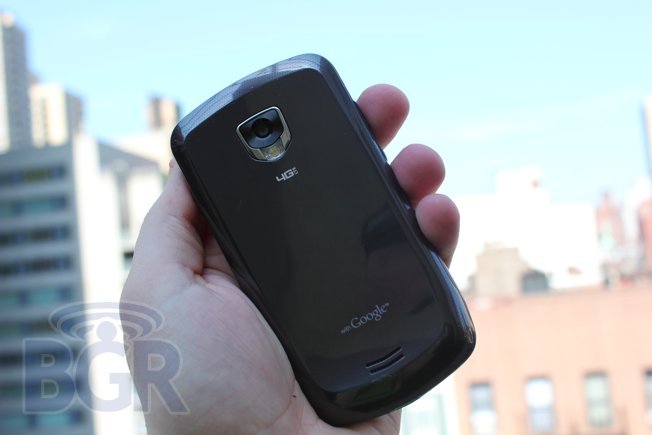
Samsung told me that the “pet name” for the DROID Charge was the “Stealth,” and that’s certainly an accurate description of its industrial design. The area below the phone’s large 4.3-inch screen tapers down to a small chin, and its rounded edges, glossy mirror gray finish, and sharp accents around the camera lens definitely add to its fighter-jet style. Samsung’s Super AMOLED Plus display is one of the clearest, brightest, and sharpest screens I’ve ever seen on a smartphone. The display offers even deeper blacks than the Super AMOLED screen on Samsung’s Galaxy S phones, which is really saying a lot. Colors are stunning and you really just have to see it to understand the beauty, but a beautiful screen this size comes at a cost; the DROID Charge definitely has a bit of heft at just over 5 ounces, but at just 0.46-inches slim it easily slid into my pocket.


Unlike the Galaxy S devices before it, the DROID Charge has hardware keys below the screen instead of touch-sensitive buttons. The keys have nice bounce and each has a soft white backlight that illuminates while the screen is activated. Under the hood the DROID Charge runs on a 1GHz processor, which is a bit lower powered than the dual-core NVIDIA Tegra 2 devices that have started to infiltrate the market. Still, there’s 512MB of RAM that helps speed things up a bit, and our unit came with a 32GB microSD card so there’s more than enough space to store videos, music, and photos. A 32GB microSD card runs about $60 on Amazon, so I’m starting to see why the DROID Charge is priced as high as it is.


One feature that I really enjoyed using was HDMI-out. You can purchase movies from Media Hub for about $9.99 each, or move files over to the phone using your USB cable, and then output them to an HDTV using a mini-HDMI cable. There were a few hiccups in the frame rates, but otherwise the movie played without a hitch. I’ll revisit this a bit more in the camera section of the review.


Software


Here’s where things get a bit stale: The DROID Charge runs Android 2.2 (Froyo) with Samsung’s custom TouchWiz user interface on top. I’m not a big fan of TouchWiz — it’s too cartoony looking, the widgets are always larger than necessary, and they don’t use screen real estate efficiently. There are several useful features, like the ability to sync Twitter or Facebook with your address book, but generally TouchWiz turns me off. Thankfully, the DROID Charge’s processor hummed along just fine despite the UI, which can slow things down just a bit on other devices. There are  also other small issues that drive me mad about TouchWiz, though — like its black e-mail interface — and at times I just wish Samsung had stuck with a vanilla version of Android on the Charge.


The Charge’s virtual keyboard mirrors those on Samsung’s Galaxy S devices, and I’m not a fan. The space bar is too small and seems to be positioned too far to the left; half the time I try to type a space I end up hitting the period button instead. This, of course, is where third-party developers come in, and I definite;y recommend installing your third-party keyboard of choice on the Charge.

There’s a fair amount of bloatware on the phone including VerizonApps, a Guided Tour, VZ Navigator, TuneWiki, City ID, Bitbop, and more. Thankfully, though, Verizon chose to use Google as the default search option on the DROID Charge, which is a welcome change from the Fascinate.


Calling / Data


The call quality on the DROID Charge was clear during my tests and I had no issue with dropped calls in New York City or during a trip to Orlando for BlackBerry World. Friends and family on the other end of the line said I sounded good, and the ear speaker was loud enough even while walking on busy streets. The speakerphone had adequate volume as well, but voices were distorted at higher levels. Callers said I sounded fine on speakerphone and they couldn’t tell I wasn’t directly talking into the handset.

The DROID Charge is Verizon’s second phone capable of placing phone calls while surfing the Internet, and this feature worked perfectly during my tests. I looked up a quick place to eat lunch while I had a friend on speakerphone, and I didn’t notice any drop in call quality or data speeds. BGR Editor in Chief Jonathan Geller, in his ThunderBolt review, wondered if perhaps the poor voice quality on that phone was related to the talk / surf feature, and I’m glad to report that’s not the case with the Charge.


Data speeds on Verizon’s 4G LTE network regularly exceeded 20Mbps on the downlink in New York City, and I typically saw upload speeds around 4Mbps. The download speeds are faster than you’ll find on any other U.S. carrier hands-down and are even on a par with home network connections.

There are drawbacks to being an early adopter, however. During my first week of testing Verizon’s 4G LTE network, it went down for just over 24 hours. Users weren’t compensated for the downtime, and I couldn’t even access a 3G network during the outage. That’s a big deal, especially for business users or those of us who rely on our smartphones throughout most of the day. Similarly, while tethered to a laptop, I noticed that the signal dropped a number of times, and there are reports from some websites claiming the same issue — hopefully this is something that will be fixed in a future software update. I’m not dinging Verizon, though; it’s the first to roll-out such a high-speed network and there are bound to be small hiccups along the way.


Battery Life


The DROID Charge moniker is quite fitting as I found the 1,600mAh needed frequent charging under heavy 4G use. The phone offered up better battery life than the 4.5 hours Jonathan saw with the HTC ThunderBolt, but it still wasn’t great. Generally, I was able to go from about 7:00 a.m. until 2:30 p.m. with moderate usage on 4G.

If you need to save battery life, there’s an option under wireless network settings to use a CDMA network only. This let me place voice calls and use Verizon’s slower 3G EV-DO network for surfing the Web. It’s definitely a welcome change over the HTC ThunderBolt, which didn’t ship with that option, although an app is now available. With 3G enabled, I was able to get through a full work day with moderate usage. Unfortunately there isn’t a widget to quickly switch networks out of the box; that would certainly be a welcome addition, but I’m sure Android enthusiasts will whip something up to fix that.


Camera


There’s an 8-megapixel camera on the DROID Charge, and I used it to shoot a bunch of photos during a trip to Florida. Images were crisp and colors looked true in daylight. Photos look amazing on the Super AMOLED Plus screen, and they just had a little distortion when I pushed them out to my 32-inch TV using HDMI-out. Pictures snapped under incandescent lights had a decidedly orange hue to them, but were otherwise perfectly acceptable.

A night shot taken of a neon sign, without the flash, had brighter colors bleeding into the darker areas of the screen, even with the camera’s anti-shake feature activated. In lower light conditions, the single-LED  flash did a decent job grabbing our subject, too, but I prefer the dual-LED option on phones like the HTC


ThunderBolt.


I shot several HD video clips in 720p, but the DROID Charge defaults to a 720 x 480 resolution, so you’ll want to be sure to activate the HD option for better video. The frame rates were fluid when I played the video back on the Charge’s display, and I was just as blown away when I watched the same clip on my TV using HDMI-out. The video and audio were both crisp and I didn’t notice any pixelation, even when panning the video around. One issue I did run into, though, is that the phone required a reboot when I unplugged the HDMI cable and then tried to plug it back in again to resume playback.


Wrap-up


If you’re looking for 4G speeds, the Samsung DROID Charge is the phone to beat — but you’ll need deep pockets. Sure, I’d take HTC’s Sense user interface over TouchWiz any day, but the DROID Charge offers a few things HTC’s ThunderBolt doesn’t, namely a gorgeous Super AMOLED Plus display and an out-of-the-box option to turn off 4G to save on battery life, which meant I was able to get through a full day with moderate usage when I didn’t need to surf the Web at blazing fast speeds.

The DROID Charge is priced at $299, which is $50 more expensive than its only 4G LTE competitor, the ThunderBolt. That’s for good reason, however. It offers better battery life, a killer display, clearer phone calls, and a much less bulky design — easily worth the $50 difference. Sure, Verizon has a number of new 4G LTE smartphones coming down the pipeline, but if you want in on the carrier’s blazing fast data now, the DROID Charge is your best bet, hands-down.
Read More >>

Sunday, June 19, 2011

Full REVIEW >> Samsung Galaxy S II


The Samsung Galaxy S II is Samsung’s second version of its extremely popular Galaxy S line of handsets — one it has done a great job of launching across a variety of carriers. The Galaxy S II raises the bar in every way from the first Galaxy S, as it should. But it also takes things one step further and absolutely obliterates every other Android handset on the market in the specifications department. It’s not just fast, it’s the fastest. It’s not just thin, it’s the thinnest. But is it the best? Hit the break to find out.


Hardware / Display


Most people love or hate Samsung’s hardware, but I find myself uncharacteristically on the fence. On one hand, Samsung pumps out solid hardware that has always been widely adopted around the world. On the other, there appears to be a little separation, at least where the U.S. market is concerned, on what people really consider to be a quality product. There’s a fine line between making a device extremely light, and one that feels cheap and unworthy of a $200 price tag. The Samsung Galaxy S II is the thinnest smartphone I have ever tested, and it’s also one of the lightest. It’s even thinner than the iPhone 4, and it’s much lighter.


One of the reasons the device is lighter, however, is due to Samsung’s continued use of what feels like a low-cost glossy black plastic for the handset’s shell. The saving grace on the Samsung Galaxy S II, however, is that the rear battery cover isn’t a typical high-gloss Samsung extravaganza, but a textured matte-finished cover.

On top of the device you’ll find a 3.5mm headset jack with secondary mic for noise cancellation. On the right side is a power button and the volume rocker is on the left. Around front there’s a 2-megapixel camera for video chat, and three of the four typical Android navigation buttons. Samsung hasn’t included a dedicated search key, though in daily use, I rarely found myself hunting for it. The home button is a physical rectangular key, and the back and menu keys are capacitive and work quite well. A nice touch is that they light up for a short period of time when the screen goes on, and then they dim and blend back into the black facade of the Galaxy S II.


As far as specs go, the Samsung Galaxy S II is, for lack of better works, a beast. We’re talking about a 1.2GHz dual-core Orion processor, 1GB of RAM, Android OS 2.3 Gingerbread, an 8-megapixel camera with LED flash and 1080p HD video recording, and 21Mbps HSPA+ support.

The Samsung Galaxy S II also features Samsung’s Super AMOLED Plus display, and it’s one of the best screens I’ve ever seen, easily besting the display on the Google Nexus S. Black levels are incredible, colors are vibrant, bright, and the display is very sharp. Viewing any sort of content with a black background will melt into the black front case around the display and make it difficult to tell where the screen starts and the case ends — it’s that good.

The Galaxy S II is also the fastest Android phone I have ever used, hands down. It’s evident across the entire OS, with web pages loading at desktop-like speeds. There’s absolutely no lag while zipping around from app to app or screen to screen, and it makes the entire Android experience much more enjoyable.


TouchWiz


Let me just get it out of the way: I’m a stock Android guy. I don’t care for any custom UI from any manufacturer on my Android device at this point. With that said, TouchWiz has it’s ups and downs. I’m not a fan of Swype or Samsung’s keyboard so I replaced the keyboard with the stock Gingerbread keyboard. I’m also not a fan of the email app and the calendar app also looks like Times Square at 2:00 a.m. — I’m just not feeling all the use of black backgrounds here. I do, however, like how you can edit the number of home screens on your device — I like three, not seven, home screens — and while I don’t use any of Samsung’s widgets, I appreciate the creativity some of them showcase.

For the average user, it’s certainly possible TouchWiz could help more than it hurts. It’s definitely more lively than what stock Android is, and it could be more straight forward to the general consumer.


Battery


Battery life typically isn’t a strong point on Android handsets, but the Galaxy S II performs very well thanks to its large 1,640 mAh battery and no doubt thanks to its power sipping dual-core Orion processor as well. Standby time lasts days — up to around three days with corporate push email on and various background apps. The Galaxy S II should no doubt be able to power you through a normal day’s worth of usage as well.


Conclusion


Hands down, the Samsung Galaxy S II is the greatest Android smartphone available on the planet… if you can get past TouchWiz. It’s the fastest smartphone I’ve ever used, it features one of the best displays I have laid eyes on, it offers great signal reception and audio performance on AT&T, it has a great camera, it’s very thin and light, and even better, it’s free from any carrier’s wrath (restrictions) since it’s the unlocked global version. The downside is that it’s not subsidized so it’s going to run you around $800 — for reference, a 32GB iPhone 4 without a contract runs $699. Of course we expect the Galaxy S II to launch under various names on all four of the major U.S. carriers, so those who don’t mind branding and bloatware will have the option of picking up this phone from your carrier of choice soon enough.

While I would have preferred to see stock Android on the Galaxy S II, the phone is so good that TouchWiz doesn’t hold it down too much, at least for me. In fact, Samsung is going to have trouble getting this one back. And who knows? Maybe I’ll even switch to Android as my primary daily carrier just for this device. Well, probably not.
Read More >>

Full REVIEW >> Sony Ericsson Xperia PLAY


Sony Ericsson’s Xperia PLAY is the company’s first smartphone focused on bringing serious gaming and a powerful handset to the masses. The slide-out PlayStation-style game controller is innovative and it enables you to interact with games on your smartphone in ways that just aren’t possible on a touchscreen-only device. With that said, there are some obstacles in the way — PlayStation Suite offers limited games, and there are some pretty big bugs even on the stock Android handset. Do the positives outweigh the negatives, though? Jump past the break to find out.


Hardware / Display


The Xperia PLAY’s hardware is, for lack of a better word, interesting. Closed, the device feels like a reasonably thick Android handset. With glossy black plastic and glossy chrome finish, the PLAY doesn’t exude high-end fit and finish, but it doesn’t feel cheap either. It’s deceptively well-weighted, even when opened, and the only complaint I have about the hardware when holding and using the phone is that the left and right triggers on the top of the handset can get in the way when the device is being held one-handed.


The display on the Xperia PLAY is great. It’s crisp, it’s clear, and the colors seem to accurately display anything I can load up on it. It’s one of my favorite displays, to be honest. Sony Ericsson has a beautiful screen with a touch sensitivity that can almost rival Apple’s perfected digitizer and screen. I really can’t say enough about this touch display, it’s probably my favorite of any Android handset, even more so than any qHD displays I’ve seen and used. It’s something Sony Ericsson has just got right, and it’s really refreshing to see.


The Sony Ericsson Xperia PLAY doesn’t fall short in the button department, either. On the front of the device you’ll find the four traditional Android menu keys, and while these are meant to serve as the primary navigation keys for the device, I can’t help but think Sony Ericsson could have implemented something better. Besides being difficult to press in some scenarios, they are ridiculously close to the display itself, and I’ve found myself accidentally tapping the display when I’ve been trying to hit the back button, for example. The layout isn’t ideal, but that’s more of a personal preference.


On the left side of the handset, there’s a 3.5mm headset jack and a microUSB port for syncing and charging. On the top of the device there’s a power on / off button, but the button isn’t on the display part of the sliding mechanism, it’s on the main middle frame. It’s a little niggle, but it would have been great if the power button was on the display piece as it would make it much easier to press when using the device one-handed. A nice touch is that there’s a notification light built into the power button that will let you know of any unread message or alerts, however. On the right side of the PLAY you’ll find left and right trigger buttons with a volume up and down rocker placed in between them.


Something that’s been truly irritating is the lack of an ambient light sensor on the Xperia PLAY. It’s one of the only smartphones in the last few years I have ever seen that lacks this feature, and while it’s not a show stopper, it’s inconvenient to have to go into the device’s setting to manually change the brightness level of the display in different lighting environments.

UPDATE: The Sony Ericsson Xperia PLAY does in fact have an ambient light sensor, it’s just not user-controllable in the settings, and it doesn’t perform too, too well, thus the reason for mistaking it’s existence.


PlayStation Controls


There isn’t a bunch to say here… the Sony Ericsson Xperia PLAY is the first smartphone to feature an actual gaming-grade gamepad, and it’s pretty close to being amazing. There’s enough tactile feedback on every button to make it feel fantastic while playing games, and the button layout is perfect. Compared to add-on third-party attachments for the iPhone or Android devices, the Xperia PLAY really sets the mobile smartphone gaming bar. One of the best parts is the ability to take a third-party app and assign the gamepad buttons to the game or emulator.


Phone / Battery


I have had serious connectivity issues with the Xperia PLAY on Verizon Wireless. I’m not sure if it’s just this review unit in particular, but in places that normally have 3G reception, I was stuck on 1X, and the phone kept on holding a 1X signal instead of switching back to a 3G one. Additionally, the signal level reported by the PLAY was much lower than other Verizon Wireless devices in the same room on the same desk. While this isn’t a scientific method by any means, it’s a little frustrating to see just one or two bars on a Verizon handset in and around New York City — especially when other Verizon phones were getting full signal just a few inches away.


Battery life is pretty decent despite the reception issues, and were completely acceptable for a CDMA smartphone. The Xperia PLAY powered through a day of moderate usage including emailing, web browsing, light calls, and hours of game playing. Your mileage will obviously vary, but all in all the battery on the Xperia PLAY should suit most people’s usage just fine.


Conclusion


The Sony Ericsson Xperia PLAY is one of the most enjoyable game-focused smartphones I’ve ever used. With a solid slide-out hardware gamepad, a fast processor, and stock Android 2.3 Gingerbread, the PLAY is truly in a league of its own. That’s not to say I haven’t had my share of frustrations with the handset. The power button seem glitchy as far as the software is concerned — the phone just won’t turn back on sometimes after the screen is locked, and it’s incredibly frustrating. Verizon’s solid voice and data network didn’t agree with my particular unit, and while I’m not positive this is an across-the-board issue, signal reception and connectivity were probably the worst of any Verizon handset I’ve used in recent memory.

I like the overall concept of the Xperia PLAY — one of the only companies in the world that could pull off a pure gaming handset is Sony Ericsson — and this is a valiant first effort in the space. But in the end, the Xperia PLAY is a little chunky and it feels like it needed a little more time in the oven. If Sony Ericsson decides to introduce a follow up handset, I have no doubt it will be a formidable mobile gaming smartphone that few if any devices could rival. The current iteration is more a concept than a full-fledged gaming device and platform, though if you’re a hardcore gamer, you probably won’t be disappointed with the Xperia PLAY. For general consumers, I’d probably recommend waiting for the follow-up version, however.
Read More >>

Full REVIEW >> HTC DROID Incredible 2


The DROID Incredible 2 recently landed on Verizon Wireless, and it has some tough shoes to fill. When the original launched, it was BGR’s favorite Android phone to date despite stiff competition from the Motorola DROID, which launched at the same time. The DROID Incredible 2 packs some decent hardware, like a 1GHz processor, an 8-megapixel camera capable of recording 720p video, and more, but its specs — and data speeds — don’t match those of phones at the higher end of Verizon’s portfolio. Is the DROID Incredible 2 a worthy successor to the original or does it fall short? Read on to find out!


Hardware / Display


I remember reviewing the original Incredible and feeling a sense of loss the day I had to send it back. It had a unique race-car inspired design and HTC even had interchangeable red and white covers for the back panel that you could buy separately. The whole idea was that HTC was totally tweaking the industrial design of the phone to really get consumers turned on to the sexy designs possible with a mobile device. There’s less shock value with the Incredible 2. The red battery compartment is gone, the contours aren’t unique anymore, and the whole device feels too similar to the original to be exciting.


The phone feels excellent in the hand, though, and the soft-touch black finish provides good grip. The volume keys are in easy reach on the top left hand side, there’s a 3.5mm headphone jack on the top across from a power button, and the back is home to an 8-megapixel camera and a dual-LED flash. I love that the menu, home, search, and return buttons automatically rotate so that they’re displayed correctly in both landscape and portrait view. HTC should definitely carry that feature into other phones.

The most noticeable difference on the Incredible 2 is its larger 4-inch 800 x 480 resolution display. I like that it’s bigger than the original 3.7-inch screen on the first Incredible, which was a hair too small, but I’m disappointed that HTC ditched the AMOLED display panel. Text looks decent on the screen, but the colors don’t pop in the way they did on the original Incredible. The trade off is that the current display is much easier to view under direct sunlight, however.


I’ll discuss the rest of the hardware in various parts of this review, but here’s a quick rundown of the raw specs: the DROID Incredible is powered by a 1GHz processor — that’s the same clock speed as the original — and it has an 8-megapixel with a dual-LED flash, a 1,450 mAh battery, a 1.3-megapixel forward-facing camera for video chat, and a 16GB microSD card pre-installed.


Software


The Incredible 2 is powered by Android 2.2.1 (Froyo) with HTC’s custom Sense user interface running on top, and its 1GHz powered through it all just fine. Unfortunately, the phone is not loaded with HTC’s new revamped version of Sense, which will make its debut on the T-Mobile HTC Sensation 4G any week now. I’ve always been a big fan of Sense. It’s one of my favorite Android user interfaces, but it’s hard to recommend software that’s already being replaced. The DROID Incredible 2 also runs Android 2.2 (Froyo), too, instead of the newer Android 2.3 (Gingerbread) OS.

Thankfully, there’s relatively little bloatware installed, save for V Cast Apps, V CAST Media, V CAST Music, V CAST Tones, and V CAST Videos. Verizon has pre-installed some other software, including 3G Mobile Hotspot, Blockbuster, Amazon Kindle, Lets Golf 2, NFS Shift, Skype Mobile, NFL Mobile, Slacker, and more, but those applications are often very popular Android apps, too, and I’m a big fan of many of them. The 3G Hotpsot application will allow you to share your 3G connection with other Wi-Fi enabled devices, and I used the Incredible 2 hotspot during an entire workday without any connection drops.


Calling / Data


Calls on the DROID Incredible 2 were solid, as is typically the case on Verizon’s phones in New York City. During a test call, the other party said I sounded “clear” while walking on the streets of New York City, and she said she couldn’t make out the background traffic. The speakerphone was a bit watery but the volume was sufficient. As far as data, the Incredible 2′s data speeds were just OK. I averaged 1.2Mbps on the downlink and 1Mbps up, which is good enough for a 3G phone but a far cry from Verizon’s brand new 4G LTE network which offers download speeds that are nearly 20 times that.


Camera


The Incredible 2 packs an 8-megapixel camera, just like the original, and can shoot 720p HD video. I was satisfied with the images I snapped — they look great on the phone itself and just as solid blown up on a computer screen. Unlike some newer phones, the Incredible 2 isn’t capable of auto-focusing while shooting video, though, which was a bit of a disappointment. Similarly, it lacks an HDMI-out port, so you won’t be able to show videos or photos on your bigscreen TV, another feature that’s supported by many other high-end devices.


Battery Life


During my few days of testing I didn’t have any problem getting through a full day of moderate use before the 1,450mAh battery ran out on the Incredible 2. Verizon rates it for 6.5 hours of usage, though, so you’ll want to bring a charger along if you’re planning to watch movies during a long plane ride or car trip.


Wrap-up


The DROID Incredible 2 is a good phone — there’s nothing inherently wrong with it — but I don’t think it brings the Incredible brand forward at all. In fact, there really isn’t anything “incredible” about it. The phone is very similar to the original, save for a larger screen and some small tweaks like a forward-facing camera, but at $199.99 it costs just as much as dual-core smartphones like the DROID X2, and it’s $50 shy of Verizon’s 4G LTE smartphones that offer much, much, faster data speeds. Is it a solid follow-up to the original? No. In fact, I like the original better.
Read More >>

Motorola Pro will be available July

Motorola Pro is an Android smartphone candybar design and QWERTY keypad but also has a capacitive touchscreen TFT. The phone