Archives

Showing posts with label Security. Show all posts

Tuesday, June 14, 2011

A Self Erasing Hard Drive? Toshiba Gives Security a Big Boost

Toshiba Self Eraser.jpeg
Imagine the following scenario: Someone steals one of your computers.  However, you are security conscious & have the BIOS password protected.  This means that the system will not even begin to boot until the  correct password is given.  This is pretty good security until the thief removes the hard drive and puts it in a different machine or a portable hard drive enclosure where it will be treated as an auxiliary drive.  Once that happens, your data is plain to see.
However, Toshiba has put a wrinkle in the above scenario with hard drives that will totally wipe themselves clean if they are connected to a different machine.
These Self Erasing Drives or SED for short encrypts all data on the drive & then unecrypts it when ever access is needed.  If the drive is accessed by another machine, the drive senses this and destroys the keys.  This leaves the data encrypted with a 256-bit AES algorithm and no way to decode it.
Here is what Toshiba has to say about these amazing pieces of hardware:

Toshiba adds advanced access security, built-in hardware data encryption, and wipe technology features to its 2.5-inch, 7,200 RPM Serial ATA storage products with the MKxx61GSYG series hard disk drives. The self-encrypting drive (SED) provides government-grade AES-256 hardware encryption incorporated in the disk drive’s controller electronics. Based on the widely endorsed Opal Security Subsystem Class (Opal SSC) specification from the Trusted Computing Group** (TCG), the MKxx61GSYG enables secure host authentication, strong data encryption and data-theft prevention features on such systems as notebook or desktop PCs, multi-function printers, point-of-sale systems, thin clients and service kiosks. Toshiba expands on the Opal SSC by adding unique security features which may be used to “wipe” protected data from the disk or deny access to protected data if access credentials are invalid, for example, if the disk drive were to be removed from the host platform.

Targeted at security-sensitive applications, the drive’s built-in hardware encryption reduces compatibility concerns associated with software encryption, while delivering transparent performance gains and a lower total cost of ownership. Deployment is fast and secure because data is encrypted during normal write/read operations. Toshiba’s wipe technology features can significantly shorten re-purposing and data cleansing operations while helping to assure compliance with data security policy. The Toshiba AES-256 encryption algorithm is certified to FIPS 197 by the US National Institute of Standards and Technology (NIST). In addition, the Toshiba MKxx61GSYG SED provides features to enable secure remote administration, using such capabilities as Intel’s Active Management Technology (AMT).

The MKxx61GSYG is compatible with leading third party security management applications, allowing seamless deployment of SEDs alongside pre-existing software encryption. Unlike software encryption, which is dependent on CPU performance and system memory capacity, the MKxx61GSYG encrypts at full storage I/O speeds and scales seamlessly in multi-drive applications.


For the full low-down, check out Toshiba's site.

Read More >>

Wednesday, May 18, 2011

Implementing Customizable Claims-Based Authorization with Windows Identity Foundation

Windows Identity Foundation (WIF) provides the basis for adding claims-based authentication to your Web services (and also to Web applications). It achieves this by adding the necessary plumbing and configuration to your solutions that enable them to interact with a Security Token Service (STS), following the WS-Federation specification. The Windows Identity Foundation SDK includes utilities and assemblies that developers can employ for integrating an STS into a solution, and it also provides a wizard for Visual Studio 2010 that can automate many of the tasks associated with using an STS, including building a simple STS for testing purposes.

The key rationale behind using an STS is to decouple the authentication mechanism from the Web service that requires users to be authenticated. By following the WS-Federation protocol, a Web service can detect whether a user’s session has been authenticated, and if not it can transparently redirect the user’s request via an STS to perform the necessary authentication processing. How the STS actually authenticates the user is up to the STS and is essentially of little concern to the Web service. When authentication is complete, the STS directs the user’s request back to the Web service, but adds a security token to the request that contains information about the identity of the user. The Web service can then examine this token to determine whether or not to authorize access. Now, although the mechanics of the authentication mechanism are of minimal interest to the Web service, determining the privileges of an authenticated user definitely is an important issue.

If you are using WIF, the information in the security token is passed to the code in the Web service that implements each operation via the static Thread.CurrentPrincipal.Identity property. This property is a Microsoft.IdentityModel.Claims.IClaimsIdentity object that contains a collection called Claims. Each item in this collection is an authenticated claim concerning the identity of the user. You can iterate through this collection to find the claim that you are interested in and verify that it matches a selected value before allowing the operation to continue. For example, if you wish to ensure that only users who reside in a particular country can perform the operation, you can check the Claims collection for the Country claim and verify that the value of this claim is appropriate; if not, you can throw a SecurityException and deny access to the user. The following code shows an example that restricts the user to being located in the United Kingdom (the ListProducts method implements an operation that retrieves product names from a database and returns them as a list):

public List<string> ListProducts()
{
// Authz without using WIF infrastructure
ClaimsIdentity id = Thread.CurrentPrincipal.Identity as ClaimsIdentity;

Claim countryClaim = (from claim in id.Claims
where claim.ClaimType == ClaimTypes.Country
select claim).Single();

if (String.Compare(countryClaim.Value, "United Kingdom") != 0)
{
throw new SecurityException("Access Denied");
}
...
}
Note: If you have previously implemented claims-based authentication and authorization with WCF by using technologies such as Windows CardSpace, you will have queried the claims that identify the user through the ServiceSecurityContext property of the OperationContext. WIF reverts to the more standardized technique of examining the Identity property of the Thread.CurrentPrincipal property.

However, although this approach is reasonably straightforward and easy to understand, it does suffer from some issues. Primarily, the authorization code is too tightly integrated into the operation, so if the authorization requirements change (such as expanding the list of countries that a valid user can lives in, or you need to authorize users based on a different claim such as their email address or date of birth), then you need to modify this method and rebuild the service. To counter these concerns, WIF enables you to decouple authorization from the code that needs to be authorized; you can implement a custom authorization manager and insert it into the WIF pipeline.

To build a custom authorization manager, you extend the Microsoft.IdentityModel.Claims.ClaimsAuthorizationManager class and override the CheckAccess method. This method takes an AuthorizationContext object as a parameter, which contains the authenticated claims and which also describes the resource being accessed. This resource might be a Web page (in the case of an ASP.NET Web application), or an operation (in the case of a Web service). You provide logic in the body of the CheckAccess method that retrieves the authenticated claims that identify the user and matches them against the resource or operation, returning true if the user should be permitted to access the resource or operation, but returning false to deny access. The key benefit of this approach is that you can supply the authorization manager as a separate assembly, and then configure the Web service to load this assembly at runtime and integrate it into the WIF infrastructure. To do this, you specify the assembly and type information in the claimsAuthorizationManager element in the microsoft.identityModel section of the configuration file. The following example assumes that the authorization manager is called ProductsServiceAuthorizationManager in the ProductsServiceAuthorization assembly:

<microsoft.identityModel>
<service>
...
<claimsAuthorizationManager type="ProductsServiceAuthorization.ProductsServiceAuthorizationManager,ProductsServiceAuthorization" />
...
</service>
</microsoft.identityModel>
This task can be performed by an administrator without requiring that the code for the Web service itself is modified. If the authorization requirements change, a developer can simply provide an updated version of the authorization manager assembly.

Another important advantage of this strategy is that the authorization manager is able to support run-time customization. An administrator can provide custom configuration information which gets passed to the authorization manager object via a constructor when it is initialized. There is no defined XML schema for this information, and it is up to the code in the authorization manager to validate and parse this information using whatever technique is most appropriate. The following configuration shows one possible example scheme (strongly influenced by Vittorio Bertocci in his book “Programming Windows Identity Foundation”). In this example, the Web service exposes operations named ListProducts, GetProduct, CurrentStockLevel, and ChangeStockLevel; all operations require the user to be resident in the United Kingdom, but in addition the ListProducts operation is also available to users in the United States.


<microsoft.identityModel>
<service>
...
<claimsAuthorizationManager type="ProductsServiceAuthorization.ProductsServiceAuthorizationManager,ProductsServiceAuthorization">
<policy operation="http://contentmaster.com/IProductsService/ListProducts">
<claim claimType="http://schemas.xmlsoap.org/ws/2005/05/identity/claims/country" country="United Kingdom"/>
</policy>
<policy operation="http://contentmaster.com/IProductsService/ListProducts">
<claim claimType="http://schemas.xmlsoap.org/ws/2005/05/identity/claims/country" country="United States"/>
</policy>
<policy operation="http://contentmaster.com/IProductsService/GetProduct">
<claim claimType="http://schemas.xmlsoap.org/ws/2005/05/identity/claims/country" country="United Kingdom"/>
</policy>
<policy operation="http://contentmaster.com/IProductsService/CurrentStockLevel">
<claim claimType="http://schemas.xmlsoap.org/ws/2005/05/identity/claims/country" country="United Kingdom"/>
</policy>
<policy operation="http://contentmaster.com/IProductsService/ChangeStockLevel">
<claim claimType="http://schemas.xmlsoap.org/ws/2005/05/identity/claims/country" country="United Kingdom"/>
</policy>
</claimsAuthorizationManager>
...
</service>
</microsoft.identityModel>
The constructor for the ProductsServiceAuthorizationManager class shown below parses the configuration information provided with the claimsAuthoriationManager element, and uses it to populate a Dictionary object listing each operation and the claims (countries) required to access the operation. When a user attempts to invoke an operation, WIF first authenticates the user by using an STS, and then authorizes the request by calling the CheckAccess method. If this method returns true, then WIF allows the operation to run, otherwise it causes a SecurityAccessDeniedException to be thrown and returned to the client:

using System;
using System.Collections.Generic;
using System.Linq;
using Microsoft.IdentityModel.Claims;
using System.Xml;
using System.IO;

namespace ProductsServiceAuthorization
{
public class ProductsServiceAuthorizationManager : ClaimsAuthorizationManager
{
private static Dictionary<string, List<string>> policy =
new Dictionary<string, List<string>>();

// Parse nodes with the following format and populate the policy Dictionary
// with the details specifying the requirements for each operation
//
// <policy operation="OperationName">
// <claim claimType="http://schemas.microsoft.com/ws/2008/06/identity/claims/country" country="CountryName" />
// </policy>
public ProductsServiceAuthorizationManager(object policyConfiguration)
{
try
{
XmlNodeList policyData = policyConfiguration as XmlNodeList;

foreach (XmlNode policyItem in policyData)
{
XmlTextReader policyReader =
new XmlTextReader(new StringReader(policyItem.OuterXml));
policyReader.MoveToContent();
string operationName = policyReader.GetAttribute("operation");

policyReader.Read();
string claimType = policyReader.GetAttribute("claimType");

if (claimType.CompareTo(ClaimTypes.Country) == 0)
{
string countryName = policyReader.GetAttribute("country");
List<string> countries;
if (policy.ContainsKey(operationName))
{
countries = policy[operationName];
}
else
{
countries = new List<string>();
policy[operationName] = countries;
}
countries.Add(countryName);
}
}
}
catch (Exception ex)
{
}
}

// Check the claim provided in the AuthorizationContext,
// and verify that it matches the requirements for the
// operation specified in the Resource property of the AuthorizationContext
public override bool CheckAccess(AuthorizationContext context)
{
bool result = false;
try
{
string requestedOperation = context.Action.First().Value;
if (policy.ContainsKey(requestedOperation))
{
IClaimsIdentity id = context.Principal.Identity
as IClaimsIdentity;

Claim countryClaim = (from claim in id.Claims
where claim.ClaimType == ClaimTypes.Country
select claim).Single();

result = (from country in policy[requestedOperation]
where String.Compare(countryClaim.Value, country) == 0
select country).Count() > 0;
}

return result;
}
catch
{
return false;
}
}
}
}
Note: For clarity, this code performs minimal error checking. If you are writing code for a production environment you should adopt a more robust approach.

WIF provides a very powerful framework for implementing claims-based authentication quickly and easily. Implementing claims-based authorization can be equally straightforward, and the WIF infrastructure enables you to decouple the authorization process from the resources and operations that require it.
Read More >>

Tuesday, May 3, 2011

Sony Still Having Security Problems


SOE.jpg
Ever had a really bad day?  I mean a really bad day?  Well, Sony is having one now, so if you've ever had one, you know how they feel.
As if this recent post wasn't bad enough, now the Wall Street Journal is reporting that Sony has suffered another security breach.  This one deals with the Sony Online Entertainment division which makes multiplayer games for PC's.
It seems that there is a potential on this hack that 12,700 non-U.S. accounts and 10,700 bank account numbers from 2007 have been lifted.  At least they didn't wait as long to let you know this time.  This one happened earlier today and Sony is already getting the word out.
It seems that this particular attack gave the hackers access to 24.6 million customer personal accounts.
Sony has stated that its systems have been under attack for 6 weeks and they are not sure why.
Scary?  You bet it's scary.  For the full version of this story, head on over to the Wall Street Journal.


Read More >>

Thursday, April 28, 2011

Sony Playstation Network is Hacked-User Info Stolen

If you haven't heard or if you don't have a Sony Playstation & play online, between April 17th and April 19th someone hacked into the global Playstation network and made off with quite a bit of info. It also brought the network to its knees keeping it offline since then and as of Wednesday it was still inaccessible.

It seems that the hacker or hackers potentially made off with: users' names, home addresses, email addresses, birthdates, PlayStation Network usernames and passwords, and answers to password security questions.

Here is the official word from Sony. At this point I'd be following the Playstation Blog pretty closely if I were a user. Also, Microsoft has reported to users that there have been Phishing attacks on its network. Needless to say, if you are your kids are users of any online gaming networks, it certainly is important to be aware of these types of security issues.

Valued PlayStation Network/Qriocity Customer:
We have discovered that between April 17 and April 19, 2011, certain PlayStation Network and Qriocity service user account information was compromised in connection with an illegal and unauthorized intrusion into our network. In response to this intrusion, we have:

  1. Temporarily turned off PlayStation Network and Qriocity services;
  2. Engaged an outside, recognized security firm to conduct a full and complete investigation into what happened; and
  3. Quickly taken steps to enhance security and strengthen our network infrastructure by re-building our system to provide you with greater protection of your personal information.

We greatly appreciate your patience, understanding and goodwill as we do whatever it takes to resolve these issues as quickly and efficiently as practicable.

Although we are still investigating the details of this incident, we believe that an unauthorized person has obtained the following information that you provided: name, address (city, state, zip), country, email address, birthdate, PlayStation Network/Qriocity password and login, and handle/PSN online ID. It is also possible that your profile data, including purchase history and billing address (city, state, zip), and your PlayStation Network/Qriocity password security answers may have been obtained. If you have authorized a sub-account for your dependent, the same data with respect to your dependent may have been obtained. While there is no evidence at this time that credit card data was taken, we cannot rule out the possibility. If you have provided your credit card data through PlayStation Network or Qriocity, out of an abundance of caution we are advising you that your credit card number (excluding security code) and expiration date may have been obtained.

For your security, we encourage you to be especially aware of email, telephone, and postal mail scams that ask for personal or sensitive information. Sony will not contact you in any way, including by email, asking for your credit card number, social security number or other personally identifiable information. If you are asked for this information, you can be confident Sony is not the entity asking. When the PlayStation Network and Qriocity services are fully restored, we strongly recommend that you log on and change your password. Additionally, if you use your PlayStation Network or Qriocity user name or password for other unrelated services or accounts, we strongly recommend that you change them, as well.

To protect against possible identity theft or other financial loss, we encourage you to remain vigilant, to review your account statements and to monitor your credit reports. We are providing the following information for those who wish to consider it:

U.S. residents are entitled under U.S. law to one free credit report annually from each of the three major credit bureaus. To order your free credit report, visit www.annualcreditreport.com or call toll-free (877) 322-8228.

We have also provided names and contact information for the three major U.S. credit bureaus below. At no charge, U.S. residents can have these credit bureaus place a “fraud alert” on your file that alerts creditors to take additional steps to verify your identity prior to granting credit in your name. This service can make it more difficult for someone to get credit in your name. Note, however, that because it tells creditors to follow certain procedures to protect you, it also may delay your ability to obtain credit while the agency verifies your identity. As soon as one credit bureau confirms your fraud alert, the others are notified to place fraud alerts on your file. Should you wish to place a fraud alert, or should you have any questions regarding your credit report, please contact any one of the agencies listed below.

Experian: 888-397-3742; www.experian.com; P.O. Box 9532, Allen, TX 75013
Equifax: 800-525-6285; www.equifax.com; P.O. Box 740241, Atlanta, GA 30374-0241
TransUnion: 800-680-7289; www.transunion.com; Fraud Victim Assistance Division, P.O. Box 6790, Fullerton, CA 92834-6790

You may wish to visit the web site of the U.S. Federal Trade Commission at www.consumer.gov/idtheft or reach the FTC at 1-877-382-4357 or 600 Pennsylvania Avenue, NW, Washington, DC 20580 for further information about how to protect yourself from identity theft. Your state Attorney General may also have advice on preventing identity theft, and you should report instances of known or suspected identity theft to law enforcement, your State Attorney General, and the FTC. For North Carolina residents, the Attorney General can be contacted at 9001 Mail Service Center, Raleigh, NC 27699-9001; telephone (877) 566-7226; or www.ncdoj.gov. For Maryland residents, the Attorney General can be contacted at 200 St. Paul Place, 16th Floor, Baltimore, MD 21202; telephone: (888) 743-0023; or www.oag.state.md.us.

We thank you for your patience as we complete our investigation of this incident, and we regret any inconvenience. Our teams are working around the clock on this, and services will be restored as soon as possible. Sony takes information protection very seriously and will continue to work to ensure that additional measures are taken to protect personally identifiable information. Providing quality and secure entertainment services to our customers is our utmost priority. Please contact us at 1-800-345-7669 should you have any additional questions.

Sincerely,
Sony Computer Entertainment and Sony Network Entertainment

Read More >>

Tuesday, February 22, 2011

SSD's are not Easy to Erase - I'm not recommending them for Patient Data Storage at This Time

I've been excited for a while now about the possibilities of SSD's (solid state drives) these types of hard drives have been showing up for the past year or so in netbooks and some other types of portable devices.

The benefits are that they have no moving parts. This means they consume much less power (which is why a netbook battery can last all day) and they also don't have moving parts to wear out.

No, however, comes word that you can't use commercial "wiping" software to reliably remove all the data. Basically this means that no matter what you do, some of your info may still be on the drive. Now, you can always remove them and destroy them with a hammer, etc, but if you've been using software to totally erase your old "regular" hard drives, it looks like that option doesn't work well for SSD's.

Read More >>

Monday, January 31, 2011

If You Haven't Changed Your Amazon Password in a While... Do So Now!

It seems that Amazon has acknowledged some type of flaw with their password system that allows people to log into your account with variations of your password.

Supposedly the flaw only affects those who haven't changed their password in years.

Rather than repeat the whole post, I'll provide a link to the story I read at Wired. Check it out and change your password!
Read More >>

Tuesday, December 28, 2010

McAfee's 2011 List of Threats

With the New Year fast approaching, tech enthusiasts are very excited about all of the latest technology that is being introduced in 2011, but what about the possible security concerns that come with all the new technology? On Tuesday, December 28, 2010, McAfee released their 2011 list of threat predictions. The company said, "The list comprises [the] most buzzed about platforms and services, including Google's Android, Apple's iPhone, Foursquare, Google TV and the Mac OS X platform, which are all expected to become major targets for cybercriminals."

"We've seen significant advancements in device and social network adoption, placing a bulls-eye on the platforms and services users are embracing the most," said Vincent Weafer, senior vice president of McAfee Labs, in a statement. "These platforms and services have become very popular in a short amount of time, and we're already seeing a significant increase in vulnerabilities, attacks and data loss."

McAfee will have to work especially hard to fend off the increasingly sophisticated malware that will be targeting Apple in 2011. So far, the Apple Mac OS platform has been decently secure, said McAfee. The iPhone and iPad are growing increasingly popular in the business realm though, and McAfee is afraid that with the general lack of knowledge about how to secure these Apple devices Apple botnets and Trojans could be a frequent occurrence and become a serious issue.

The biggest thing that people need to be really careful about is social networking sites. McAfee said that sites like Twitter and Facebook can easily fall prey to problems like URL shortening scans. They continued saying that they knew that utilizing abbreviated links does make it easier to condense your 140 character limit Tweets, but sometimes these links are also an easy way for criminals to mask and direct users to malicious Web sites. Each minute there are more than 3,000 tiny URLs created. Due to these astronomical numbers, McAfee said that they expect to see an increasing number of URLs that will be utilized for spam, scamming, and other malicious purposes.

Although a recent study showed that only 4 percent of adults really use location-based services, companies are continuing to release location-based features including Foursquare, Google Latitude, Facebook Places, and more. McAfee warns that the information that is shared on sites like these could easily enable cyber criminals to formulate a targeted attack. They also predicted that in 2011 there will be an increase in the use of this type of tactic across most of the popular social networking sites.

A lot of these location-based services that people utilize are used via their mobile phones. Because of this, McAfee is also predicting a “rapid escalation” in the number of mobile attacks due to “widespread adoption of mobile devices in business environments, combined with historically fragile cellular infrastructure and slow strides toward encryption."

McAfee also said that the increased use of Internet TV connections could pose a serious security risk. If manufacturers just rush into releasing their products, they could run into some major issues with suspicious and malicious apps on platforms such as a Google TV device. "These apps will target or expose privacy and identity data and will allow cybercriminals to manipulate a variety of physical devices through compromised or controlled apps, eventually raising the effectiveness of botnets," McAfee said.

These weren’t the only things that McAfee had on the threat list that they released. The list also included:

Hacktivism: McAfee is predicting that there will most definitely be a rise in the number of possibly politically motivated cyber attacks. "More groups will repeat the WikiLeaks example," McAfee said. They continued saying that unlike WikiLeaks though, the strategy will be much more sophisticated and leverage social networks.

Friendly Fire: McAfee is saying that there will also be a rise in the use of malicious content that is disguised as an e-mail from a source that you know. There is “signed” malware that works to imitate legitimate files that McAfee is afraid will be much more prevalent. They also said that “friendly fire,” which is a threat that seems to come from your friends but really is a virus such as Koobface or VBMania, will become a much more prevalent choice by cybercriminals. McAfee also said that these attacks go hand-in-hand with social network attacks and that these social network attacks could quite possibly eventually overtake e-mail attacks.

Botnets: McAfee Labs is predicting that with the merger of Zeus and SpyEye that there will be more sophisticated bots that will be produced because of the advancements for bypassing security mechanisms and law enforcement monitoring. McAfee Labs also says that they expect to see an increase in botnet activity that begins to adopt data-gathering and data removal functionality, instead of the more common use of sending spam.

Well, one thing that can definitely be taken from McAfee’s 2011 list of threats is that there are definitely threats out there that users want to avoid. Security is a big issue that many people tend to avoid, including myself. Protection and caution is necessary and is something that people really need to pay a little more attention to.

A Tech Travel Agent from Rentacomputer.com, the Worldwide Technology Rental Company will schedule installation of projectors, computers, and office equipment on a permanent or temporary basis in over 1000 cities worldwide. Call 800-736-8772

We have 3987 Installers, Technicians and Engineers stationed worldwide to serve you.
Read More >>

Wednesday, November 17, 2010

Large Software Announces docLock - Military Grade File Protection

Looking to secure your documents and files? Nowadays who isn't? If that's the case then take a look at docLock. It's something I'll be evaluating in the next few weeks and I'm excited to be able to use it.

Here's all the info:

Enjoy peace of mind while ensuring privacy and protection of sensitive data
SAN DIEGO, Calif. (November 16, 2010) – Large Software, a provider of easy-to-use consumer software including PC Tune-UpTM, announced today the launch of docLockTM, a software tool that allows users to protect and secure files and folders on their PC with military-grade password protection – all with just a click. In addition to protecting sensitive data, the software also makes managing this protection a breeze –with advanced features such as a password generator and a “visual password” function that allows users to conceal their hard-to- remember password in a photo. Since data must often be shared, the software offers a host of ways to securely share protected documents, photos, videos, Zip files, PDFs (or even entire folders) with others – even if they don’t have the software. Users also have the option to securely create portable versions of protected documents that can be easily transported via memory stick, USB drive, flash drive, external hard drives, or other mobile storage device. An ideal gift for the holidays, docLock is available at a reduced price of $29.95 for a limited time (MSRP of $49.95 thereafter).

Perfect for home users or equally ideal for accountants, lawyers, stockbrokers, bankers, small business owners, or anyone interested in protecting sensitive or confidential computer data,
docLock offers complete protection and management of users’ computer data. Use docLock to protect computer files such as tax returns, financial documents, credit information, medical records, photos, videos, etc. In addition, docLock goes a step further with its protection to include features such as “Secure Delete” and “Clean Free Space” which make it easy to remove files and free space so that deleted files will be completely unrecoverable – especially useful for those who may be upgrading to a new computer this holiday season.

For added convenience and quick sharing, docLock allows users to e-mail locked files to recipients that might not have docLock installed, and to make all locked files portable by transferring locked files from PC to PC using any USB/Flash drive, again without having to have docLock installed.

“We want to show people how easy and pain-free it can be to protect your files and information since we believe very strongly in the old adage ‘better safe than sorry,’” said Nick Forcier, CEO of Large Software. “You can now e-mail sensitive documents and the recipients do not have to download any software to open the files, they just need the password you create for them. Whether you’re a computer pro or just an everyday user, docLock was built for those concerned about their privacy.”

ABOUT LARGE SOFTWARE
Large Software® is an innovative software solution provider that applies new thinking and ideas to create simple, valuable, and trusted experiences with technology. The company’s premier product, PC Tune-UpTM, enables users of all technical levels to quickly and easily clean their computers and keep them running smoothly. Large Software is a privately-owned company that was founded in 2006 by NNJ Corporation. The company is headquartered in San Diego, California. For more information, please visit www.largesoftware.com.
Read More >>

Thursday, October 14, 2010

Pogoplug Pro Now in Black, Oh and with Wifi too!

Here's a nifty little item that just got a whole lot better. The Pogoplug is a device that allows you to plug in USB external drives and then it makes them available over the net without being attached to a computer. How cool is that? Imaging being able to access important files stored in the safety of your home or office, anywhere on the planet? Even better is that the new Pogoplug Pro is wireless meaning that if you have WiFi setup already, you can plug the device in anywhere that can reach your WiFi network and you still have access to your files and drives without even connecting the device to your router. Sweet!

Add to that the price of $99 and it's availability at Best Buy and there is no reason you shouldn't have one. What are you waiting for?

For all the details, check out the Pogoplug website.
Read More >>

Thursday, September 23, 2010

Backing Up with MyBook

MyBook Essential 2TB.jpg
For those of you who have seen/heard me speak about the benefits of a chartless office, you've also had the chance to hear my crazy anal retentive backup strategy.  Because portable hard drives just keep getting larger in capacity and smaller in price, there is just no viable argument against using them.
They are quick, efficient, affordable, reliable, and very easy to use.  My life, both in my office and in my home, revolves around a variety of these devices andI don't think I could function without them.
The purpose of this post is to highlight the affordability of these drives.  According the Sam's Club website, they currently feature a Western Digital My Book Essential 2TB drive (that's right, two terabytes!!!) for 128.88
About 3 years ago I purchased a similar device that had 300GB for roughly $25 more.  That means you can now buy about 600% more drive space for $25 less.  That is nothing short of amazing.
Unless you are doing a lot more storage in your office than I am (and I don't really think that is too possible or practical) a 2TB drive should fit your needs nicely.  Simply get one for each day of the week or each week of the month and you are good to go.
While I'm also a fan of online backups, downloading multiple gigabytes of data, even over a highspeed connection, can take a long time.  We're talking many hours at best and perhaps days for online backups as opposed to single digit hours of recreating from a portable hard drive or even less, if you can just plug it in and use it on your system.  Online backups are fine and recommended, but only as a redundant system to the portable hard drive system I've outlined here.

Read More >>

Tuesday, September 21, 2010

Y5 - Watching Your Battery While Watching Your Back

Y5.jpg
As I become more and more enamored of the Android OS, I find myself looking at apps designed for it and wondering "why not me?".  As most of you know, I'm currently using a Palm Pre and am none too happy with it at this point in time.  When I came across the info on Y5 Battery Saver it had a double impact on me.  The first was that it's another example of innovation from the app developers of both iPhone and Droid platforms.  Palm was supposed to have a thriving app store, but it never really got off the ground and now I really don't notice much innovation at all.
The second thing was how this innovation for Droid actually helps battery life. My Pre's battery life is definitely nothing to be proud of and part of that is due to WiFi.  The phone is constantly looking for a signal no matter where I am.  Now, I understand how that works.  I have great WiFi coverage in my house and in my office.  Because of that I want my phone to be able to access that connection and utilize it.  So in order to do that, I have the WiFi on at all times.  When I come in range, it connects automatically.
Of course the downside is that whenever I'm not in my home or my office, the device is wasting valuable battery life sniffing the air for a WiFi connection.  The Pre battery life is short anyway and adding that task to the mix just burns through it even faster.  So, the green eyed monster reared its ugly head when I saw this program for the Droid.  In MY world, I'm manually turning off WiFi to save battery and then trying to remember to turn it back on when I'm in range of a good and trusted signal.
The free Y5 Battery Save App basically keeps an eye on your WiFi pays attention when you connect to a hotspot.  It uses cellular signal triangulation to figure out your location (not GPS) and remembers where the hotspot is located.  It then tracks you and as you move away from that area, it turns the wireless function of your phone off to save the battery.  From time to time it will check your location using triangulation and if you are in an area where you've connected via WiFi before, it will turn on the WiFi function and your phone will connect to the network.  All of this happens with no user input at all!

Read More >>

Wednesday, August 4, 2010

Backup Security - And Why It's Important

Some people will tell you I'm a control freak when it comes to the subject of backing up my data... and they'd be right. I'd even get a twinge of pride hearing them say that. After all, it's *your* data and the importance of it cannot be stressed enough.

One of the things I try to do, both in my writing and in my speaking, is to share stories and questions I get from other folks working in the trenches just like you and I. Today I got an interesting and somewhat tragic one.

Today's email came from a doctor who was on vacation, but had admin staff in the office to process payments, call on outstanding insurance claims, schedule appointments, and basically do all the things that needed to be done/caught up on.

Because accounting was being done and appointments were being made, the doctor felt that it was a good idea to have the practice operating system backed up in order to make sure these changes would be preserved in the case of a catastrophic data loss.

The doctor put one trusted and long term employee in charge of the task. When the doctor came back from vacation the employee reported that a portable hard drive containing the backup had been lost. The employee thought, but wasn't sure, that it had accidentally wound up in the employee's
home garbage.

We can learn a couple of valuable lessons from this unfortunate experience. I'm always a big fan of trying to learn whenever a mistake is made. My main two points from this lesson are as follows:

1. Never delegate the mission critical task of backing up your office data unless you truly have no other choice. No one cares for your business or your data like the business owner. I know lots of doctors that delegate this mission critical task to a team member on a daily basis, but that goes against my whole philosophy of data management. You should always know where your backup is. If you cannot get to it, it cannot help you. In the case above, the doctor didn't have much choice, but I can fix the problem with point #2 below.

2. As part of your backup strategy, you should be using the ioSafe. This device can be left In your office, connected to your server and is heatproof and waterproof. This means that the backup can be done and the backup can be left in the office. Now I don't normally recommend this as the only backup when the doctor is In town and all is running normally but in this instance, it would have been acceptable. The backup could have been run by the team member or the doctor could have logged in remotely after hours and run it. Either way this would have kept the backup drive out of the hands of the employee who eventually somehow lost it in their trash.

Normally I consider the ioSafe as one more link in the data security chain that also includes portable USB hard drives among other things.

So please get an ioSafe and take your backup offsite with you. Get your data security plan on paper and follow it. Eventually you'll need that plan and you'll be glad you have it.


- Posted using BlogPress from my iPad
Read More >>

Friday, July 30, 2010

Citigroup Finds a Security Concern in their iPhone App

Citi screen.jpg
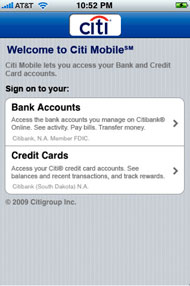
Citigroup is encouraging users of their iPhone app to discontinue its use and upgrade to its latest version.  Citigroup has indicated that the faulty app was accidentally saving info pertaining to the account of the individual using it.  The info included account numbers, bill payments, and security access codes.  This data being left on the device means that others can access it as well and that leaves the customer incredibly vulnerable.
According to Citigroup, the updated version will delete any Citigroup info that may have been stored on the device.  Kudos to them for discovering the problem, going public with it, and offering a fast solution.  The company has stated they do not believe that anyone was affected from the flaw.
This demonstrates that even apps that are approved by Apple and downloaded by customers from the App Store may not be free of bugs or security holes.  I expect to see more of these types of stories as our world continues to evolve around mobility  with the smartphone acting as the center point.  Cases such as this are the reason that I recommend waiting and not being on the leading edge of using apps such as this.  Give them some time to be used by others and have the bugs worked out of them before jumping in with both feet.

Read More >>

Friday, July 9, 2010

Summer Travel with Your Computer

Summer Travel with Your Computer

Let's face it. With computers becoming more and more mobile, many people are traveling with their laptops, smartphones, tablet computers, and even desktops in some cases. Vacation doesn't necessarily mean a vacation from EVERYTHING in 2010. We still check in with the office, we still check our email, and we still surf the internet or play games. But what happens if you have a problem? How do you prevent a problem from occurring? If you're planning to take you computer on the road this summer, here are a few tips for you to keep in mind:

- Remember when you are on a public network, you are vulnerable than you would be at home on your own network. Unless you have a firewall, any data that can be shared on your home network can be shared with the other people using the same network you are, whether it be in a restaurant, hotel, or other spot.

- Purchase and take along a car adapter. My personal laptop battery only lasts about two-three hours. That was a bit disappointing when I recently found myself in the backseat of my grandfather's car for a five-hour drive to Florida. I was able to get a little work done and play a few computer games, but over half of the trip was spent wishing I'd charged my iPod. So, take your car adapter along for long rides, or don't use power-hungry applications.

- If you are going to have to rely on your battery more than usual, make sure your computer is running smoothly. Get yourself a tune-up, defrag your hard drive, run a few malware removal programs and delete or disable programs you no longer use for quicker boot-up and optimum performance.

- Be aware of thieves. Sure, we worry about people stealing our data but if someone has physically stolen our computers, data stolen over unsecure networks is the least of our worries. According to LoJack for Laptops, 600,000 laptops are stolen from cars and hotel rooms each year. Fortunately, there are laptop locks you can purchase that prevent this from happening. Also, use common sense. If your computer is in your car and you need to run into a store, don't leave it in plain view. Keep it in a suitcase or in your car's trunk.

- Power down. If you're done working with your computer, turn the power off completely. Wireless connections and even Bluetooth connections can leave you vulnerable to attacks.

- Find out where you can get reliable tech support and computer service. Many hotels offer tech support but many do not. If you find yourself with a problem, you don't want to be stuck, trying to find someone who can help get you up and running again. A quick call to a company like Computer Service Now (1-877-422-1907) can take care of any of your problems, no matter where you are located.


Looking for Computer / PC Rental information? Visit the www.rentacomputer.com PC Rental page for your short term business PC needs. Or see this link for a complete line of Personal Computer Rentals.

Read More >>

Wednesday, April 28, 2010

Keeping Your Child Safe Online

Keeping Your Child Safe OnlineKids are getting online more than ever these days, especially those who are into social networking websites such as Facebook, Twitter, and MySpace. I've seen kids as young as six or seven years old with Facebook accounts. While these websites can be fun, they can also be dangerous if they fall into the wrong hands and as a parent, it's your duty to make sure your child know the risks and how to protect themselves from harm's way.

Kids love to get online and are often more knowledgeable than their parents and teachers. That's why it's important that parents and teachers should take steps to learn about what's happening online and what their kids are involved with. Kids left to their own devices could end up in a number of troublesome situations, from dealing with a cyber-bully or a schoolmate with ill intent, to facing child predators or even con artists.

Communication is important. Talk to your kids about what they're doing online and remind them of the danger they could face and what to be on the lookout for. But there are other things to do to keep your kids safe.

1. Take advantage of parental controls. Children don't want their parents watching every move they make but many websites offers ways for parents to monitor or control their children's online activity while respecting their privacy. Talk to your kids about exactly what you plan to monitor or control and be honest with them to gain their respect.

2. Keep your computer in an area of the house where you can be there to keep an eye out, without hovering over your child's shoulder. Insist computers stay in the kitchen or living room and not in a bedroom or office, where your child can lock themselves away to get online.

3. Don't allow your children to meet random strangers whom they've met online. In the event your child absolutely has to meet someone, make sure a parents or trusted adult accompanies them. Make sure your children know the potential risks of someone not really being who they say they are.

4. Make sure you know the "code" your kids are using online. Acronyms such as "TAW" means teachers are watching and "PA" means parent alert. There are dozens of other ways kids use code to let their online friends know there is an adult around. If you see these frequently, you may want to investigate further what your child is doing.

4. Make sure your child's teacher is monitoring their online usage. Many schools have blocked certain websites but with kids' knowledge of the web, they can find other ways to get into trouble. With computers in almost every classroom these days, teachers should constantly monitor their students' use. If a student is clicking out of a window when you walk by or a group has gathered around one computer screen, chances are, your students are not doing what they should be.

5. Let your child know that they do not have to feel uncomfortable having a conversation online, just as in real life. Whether it's a friend or stranger they're talking to, make sure they know that feeling scared, trapped, threatened, or offended is not OK and it is OK to end that conversation. Talk to them about how they can end the conversation promptly and let them know they can talk to you about how they feel.

6. If you do set up a Twitter, Facebook, MySpace, or other social networking website, make sure your child is taking advantage of the privacy settings. Make sure your kids are only adding friends who aren't safe to talk to and keep an eye out for anything suspicious.

7. Make your children aware of malicious information, such as spam or virus threats. Help them understand what it means and what they should and shouldn't open or click on.

8. Google your children's names on a regular basis. Again, you don't want your child to feel like you are spying on them, but you can do this to show them just how easy it is for ANYONE to find out anything about them. If your child has a blog, a social networking site you are not aware of, or have posted any information about themselves online, it will most likely come up in a search.

9. Again, communication is key. Make sure your kids know that not everything they see online is legitimate and talk to them about incidents in the news, so they know the risks.


Looking for Computer / PC Rental information? Visit the www.rentacomputer.com PC Rental page for your short term business PC needs. Or see this link for a complete line of Personal Computer Rentals.
Read More >>

Tuesday, March 30, 2010

Victorinox Launches Swiss Army Flash Drive - Unhackable?

I've always thought the Swiss Army flash drives were way cool. The whole idea of a Swiss Army knife gets most geeks ready to pull out a credit card. Then came the idea of putting a jump drive in the knife and my "geek-o-meter" went off the scale. Well imagine my reaction when I learned today that the Victorinox company, makers of the Swiss Army knife, have released a new version called The Victorinox Secure Pro.

This device isn't just a flash drive in a knife like the older models were. This one has some security features that has prompted the company to offer a prize of £ 100,000 to anyone who can hack it.

The device features AES256 encryption as well as a fingerprint reader and, get this, a thermal and oxygen sensor that can tell whether the finger is still attached to its owner or not.The device will sell for £100 for an 8GB model and £245 for a 32GB model. Amazing technology and the price isn't too bad.

The only drawback for me is that the software to run it is Windows only currently.
Read More >>

Saturday, March 27, 2010

Student Loan Company: Data on 3.3M People Stolen

In the continuing saga of large companies failing to keep data safe, comes this story. Educational Credit Management Corp has admitted that information on 3.3 million people has been stolen from its headquarters.

Rather than try and explain the whole thing, here is a link to the story on Foxnews.com.
Read More >>

Friday, March 26, 2010

Zomm - Never Misplace your Mobile Phone Again


Every once in a while I stumble across a product that is a "slap your forehead" kind of thing because it's so simple and solves a common problem and I wonder "why didn't I think of that?"

The Zomm is that kind of product. In February I was at the Chicago Midwinter Dental Meeting and I was on my way to an event hosted by Danaher on the 99th floor of the Sears Tower. The building is considered a national landmark, and as such, you are screened before entering. It's similar to what you go through in airports. As I stepped up, I reached for my Palm Pre mobile phone only to realize it wasn't in my pocket. I panicked, as my entire life was in that phone. I had just gotten out of cab, was it rolling around on the floor bouncing all over Chicago? Fortunately when I got back to my room that night, it was laying on the bed where I had left it. I was relieved, to say the least.

Now there's Zomm. It's brilliant in its simplicity. The idea was conceived by a mom who kept hearing friends and her kids complaining about losing their phones. It connects to your phone via Bluetooth and is attached to your keychain. It sounds an alarm if you get more than a few yards away from your phone. It also provides call notification with full mobile speakerphone functionality, provides a panic button and calls emergency assistance from anywhere in the world with just one press of a button.

The device is ingenious and will be available in summer 2010. You can even preorder them for $79.99 from the Zomm website. Very cool!!!
Read More >>

Tuesday, March 16, 2010

Never Use These Passwords

Never Use These Passwords


Computer security is more important than ever these days and one of the most simple things you can do to protect yourself is come up with a password that is not easy to guess. Sure, it's tempting to come up with something easy for your own benefit; with all of passwords we have to remember these days, you probably find yourself forgetting your passwords if you don't keep careful documentation of them, but an easy password is like an invitation to anyone looking to steal your information.

According to researchers at the University of Maryland's James Clark School of Engineering in College Park, unsecured computers are hacked into over 2,000 times a day or every 39 seconds. Study leader Michel Cukier says it's a lot more common than you think, "Most of these attacks employ automated scripts that indiscriminately seek out thousands of computers at a time, looking for vulnerabilities. Our data provide quantifiable evidence that attacks are happening all the time to computers with Internet connections. The computers in our study were attacked, on average, 2,244 times a day."

Hackers are experts at coming up with passwords. For example, many people use their user name as their password. If you think you're being clever, guess again. 43% of the time, hackers are able to guess passwords by simply guessing that it's the user name. So what other kind of passwords are common and easily guessed? Below is a list of the ten most common passwords:

  1. User Name
  2. User Name with 123 at the end
  3. 123456
  4. the word "password"
  5. 1234
  6. 12345
  7. passwd
  8. 123
  9. test
  10. 1

If any of these sound familiar, you probably need to change your information immediately. In addition, you might want to reconsider your user name if it's one of these top ten common user names:

  1. root
  2. admin
  3. test
  4. guest
  5. info
  6. adm
  7. mysql
  8. user
  9. administrator
  10. oracle

Once a hacker gains access to your computer, any number of things can happen. According to the study, the first things they do are check your software configuration, change your password, check your hardware and software configuration again, download a file, install the downloaded program and run the downloaded program.

But why are they doing this? Often, they are creating a "botnet." A botnet monitors your computer and reports back to the hacker. They can lead to fraud or identity theft, disrupt other networks or damage computer files, and lots of other criminal activity.


Looking for Computer / PC Rental information? Visit the www.rentacomputer.comPC Rental page for your short term business PC needs. Or see this link for a complete line of Personal Computer Rentals.

Read More >>

Sunday, January 24, 2010

Great Products For Child-Proofing Your Computer

Great Products For Child-Proofing Your Computer

Anyone with a child knows they are fascinated with computers, starting at a very young age. Leaving your child alone with your computer is not the ideal situation, but watching them every second isn't always possible, either. Whether you want to protect your children from the many dangers of the internet or protect your important files from little hands who may not know exactly what the "delete" button means, the following programs can help make your child's PC experience more enjoyable and help you rest a little easier.

Safe Eyes 5.0 This program does everything you need and then some. It's touch - your smartest kid won't break the code of protection - and it covers up to three computers. It's compatible with both Mac and PC and retails for about $49.95.

Peanut Butter PC 3.0 Peanut Butter PC not only protects your files, but it keeps your kids entertained at the same time. It's not nearly as tough as Safe Eyes, but it does have interactive elements. However, in a review, PC Mag says they aren't very exciting. This one retails for about $24.95.

Hoopah Kidview Computer Explorer 6 This one is perhaps a bit too cutesy for older kids, but it will keep the little ones out of your important files. It offers kid-safe email and keeps web-surfing age-appropriate and it sells for about $39.95.

KidZui 5.0 KidZui allows your kids to surf the web, play games, view videos and interact socially online in a very lively environment. And it does it all for a mere $7.95.

Net Nanny 6.0 This is probably the best choice for child-proofing your PC. It does what you probably expect it would, but it also offers a number of unique features not found on any of the other programs. It has secure web-traffic filtering, ESRB-based game control, and records IM conversations if they come across as dangerous. You can monitor and manage from any location with email alerts and remote configuration. This one is $39.95.

OnlineFamily.Norton This is the only free product on the list but it's actually pretty good quality compared to a few of the others. It blocks bad websites, controls how long your child can spend on the computer, supervises chats and social network use. It works with both Macs and PCs and remote configuration and reporting is super-easy.


Looking for Computer / PC Rental information? Visit the www.rentacomputer.com PC Rental page for your short term business PC needs. Or see this link for a complete line of Personal Computer Rentals.

Read More >>