In this post, I'm going to dive into Feature Delegation by walking through its use in IIS Manager, and why I'm using it to set up my shared hosting environment.
I'll lay out my scenario first. I have two new customer who want me to host their Web sites. The first customer created an ASP.NET site, while the second customer created a static HTML site. I've created a site for each customer, Site 1 and Site 2, and now I'm going to configure Feature Delegation for each site.
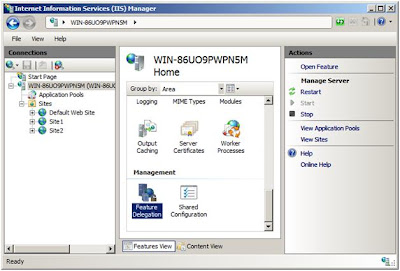
You'll see in the image below that I'm at the server level in IIS Manager. This is the only place where I can access Feature Delegation.
After I'm into the Feature Delegation page in IIS Manager, I have a choice to make. I can choose to delegate monolithically, meaning that all features that I delegate are available to all sites on my server, or I can customize feature delegation for each site. Since I have customers with two distinct sites—one required ASP.NET support, the other only static files--I'm going to customize delegation for each site.
(I could, of course, do a combination of the two, but my choice is for illustrative purposes only at this point.)
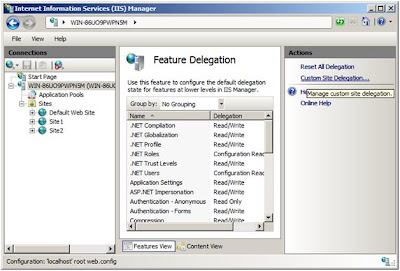
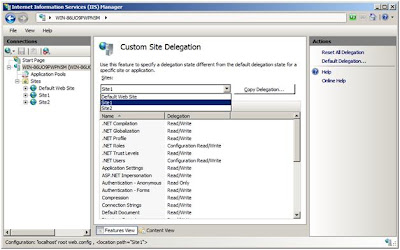
I'll now choose the site I want to set up delegation for. Site 1 is that static site, so I'll do that first.
Since this site doesn't need to support ASP.NET, I can lock all of the .NET features by setting their delegation to Not Delegated. You'll see below that I've only done this for the .NET Compilation feature. Otherwise the defaults for all of these settings are Read/Write, which allows sites to configure these features.
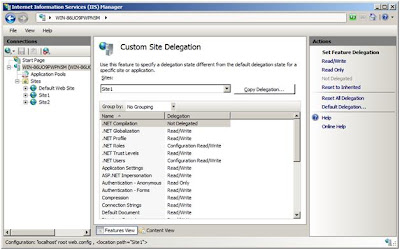
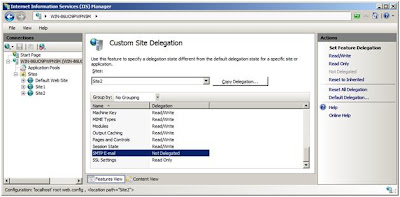
Now I've changed over to Site 2, the site that supports ASP.NET. My customer said he wasn't going to use SMTP E-mail, so I've set delegation for that feature to Not Delegated.
I can also copy either of my customized sets of delegation settings to other Web sites as necessary. I simply click the Copy Delegation button, and then I choose which sites I want to have the same delegation settings.
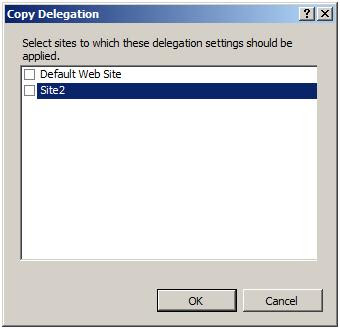
This can save a lot of time. In this way you can create delegation setting templates, as I've come to call them, and apply these templates to new sites that have similar requirements as existing ones on your server.
For any site you plan to provision, you should review the list of features available for delegation with your customer and decide which features the customer needs to be able to configure. For my money, you only want to delegate a feature to a customer if you need to.
A couple of points to remember:
Finally, with IIS 7.5 coming out with Windows Server 2008 R2 and Windows 7, Microsoft has made the custom errors feature safe for delegation. Delegating custom errors securely in IIS 7 was an involved process, but IIS 7.5 addresses this issue to allow hosters to delegate custom errors as easily as any other IIS feature. For more information, see Kanwaljeet Singla's blog entry.
Next post, I'll be setting up remote administration for my two sites and seeing the effects of my delegation settings.
Read More >>
I'll lay out my scenario first. I have two new customer who want me to host their Web sites. The first customer created an ASP.NET site, while the second customer created a static HTML site. I've created a site for each customer, Site 1 and Site 2, and now I'm going to configure Feature Delegation for each site.
You'll see in the image below that I'm at the server level in IIS Manager. This is the only place where I can access Feature Delegation.

After I'm into the Feature Delegation page in IIS Manager, I have a choice to make. I can choose to delegate monolithically, meaning that all features that I delegate are available to all sites on my server, or I can customize feature delegation for each site. Since I have customers with two distinct sites—one required ASP.NET support, the other only static files--I'm going to customize delegation for each site.
(I could, of course, do a combination of the two, but my choice is for illustrative purposes only at this point.)

I'll now choose the site I want to set up delegation for. Site 1 is that static site, so I'll do that first.

Since this site doesn't need to support ASP.NET, I can lock all of the .NET features by setting their delegation to Not Delegated. You'll see below that I've only done this for the .NET Compilation feature. Otherwise the defaults for all of these settings are Read/Write, which allows sites to configure these features.

Now I've changed over to Site 2, the site that supports ASP.NET. My customer said he wasn't going to use SMTP E-mail, so I've set delegation for that feature to Not Delegated.

I can also copy either of my customized sets of delegation settings to other Web sites as necessary. I simply click the Copy Delegation button, and then I choose which sites I want to have the same delegation settings.

This can save a lot of time. In this way you can create delegation setting templates, as I've come to call them, and apply these templates to new sites that have similar requirements as existing ones on your server.
For any site you plan to provision, you should review the list of features available for delegation with your customer and decide which features the customer needs to be able to configure. For my money, you only want to delegate a feature to a customer if you need to.
A couple of points to remember:
- As the server administrator, I can still configure all of the installed features on the IIS server for each Web site. The remote administrators for my sites can only configure the features that I delegate to them.
- If you perform feature delegation then want to change delegation settings at a later date, you need to review how any changes you make will affect your customers' sites and applications. Always use a test server to determine the effect delegation changes will have before you make changes to your production servers.
Finally, with IIS 7.5 coming out with Windows Server 2008 R2 and Windows 7, Microsoft has made the custom errors feature safe for delegation. Delegating custom errors securely in IIS 7 was an involved process, but IIS 7.5 addresses this issue to allow hosters to delegate custom errors as easily as any other IIS feature. For more information, see Kanwaljeet Singla's blog entry.
Next post, I'll be setting up remote administration for my two sites and seeing the effects of my delegation settings.


