Archives

Tuesday, August 29, 2006

Installing WM5 ROM on HTC Typhoon(Krome IQ 700)

Owing to much confusion with a recent site change of WM5 ROM for HTC Typhoon,I had to recycle the post here.

Firstly,download the latest ROM from Ronswens' site.
Most of the confusion starts now --- Few of my friends complained about the error during installation.This occurs mostly due to the version of SPL on your phone.It should be upgraded to SPL 1.01.0109.

So,lets kickstart our venture into WM5.Follow this ***** link ***** right away. First we need to Unlock the phone followed by flashing the compatible SPL 1.01.0109.Now,we need to use mtty1.42.exe to flash WM5 ROM on your phone.Please wait untill it totally installs,'cos you notice a technical snag during installation.Ignore it and wait for the message : "Installation successful!!"

Change in Ronswens' site for WM5 ROM :: http://user.cityline.ru/~ronswens/
Support site (Forum) :: http://ronswens.jconserv.net/
Read More >>

Sunday, August 20, 2006

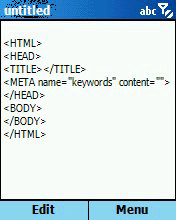
Vieka WordPad 2.9 :: The best freeware for your Windows Mobile

Was charmed at this stunning application :: so many appealing features backed with a 'freeware' tag!!You can't ask for more!
  • A complete wordpad for editing text file on your Smartphone.
  • Open/Save/Save As any text files anywhere on your Smartphone.
  • Simple file management functions such as New Folder/Rename/Delete.
  • Edit functions that you are familiar with, such as Cut/Copy/Paste/Undo/Select/Select All/Clear All.
  • Search functions that you are accustomed to, such as Find/Replace/Replace All.
  • Font change and Word Wrap for easy viewing.
  • Go To function for fast location.
  • Customizable elements for quick phrase editing.
  • Customizable templates for preset template editing.
  • Customizable attributes for additional template editing.
  • HTML 4.0 templates for rapid HTML editing.
(Technical briefing from smartphone.net)
Read More >>

Download manager for Windows Smartphone :: DManagerSP

I'm sooo used to using download client on my PC (which accelarates your download speeds) and recently I have been using a similar kinda application on my Smartphone known as DManagerSP.It does a fairly decent job.It comes handy when you need to download files while travelling.Download it here.

To ensure maximum productivity,you might follow this trick ::
1)Lookup the link for download (mp3,wmv,....) on Pocket IE.Just click on the link and then click on right soft key.You will see the address bar and the link for the file.
2)Now use Xbar to copy the link and paste it in a new text file (DManagerSP's favorites text file found in DManagerSp's installation folder @ /program files) using pocket WordPad.
3)Now you can open DManagerSP-->click on menu-->Favorites and Download the file!!

DManagerSP is the best download client for Windows Mobile Smartphone so far.
Vieka WordPad 2.9 is an equally compelling feature rich application.Importantly,both are freeware!!
Read More >>

Monday, July 24, 2006

ActiveSync your Smartphone over Bluetooth

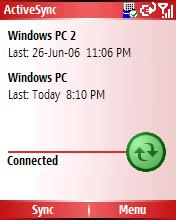
I'm bored of ActiveSyncing my mobile over USB.Let's use BlueTooth(BT) instead!I have used HTC Typhoon with WM5 ROM and Microsoft ActiveSync 4.2.I never knew that it would be so easy to setup BT for ActiveSync.Ok,lets get started....

1)Lets allocate a COM port for the connection.On your PC,click on Start->Control Panel->BlueTooth Devices->Options (Check on "Turn Discovery on")->COM ports(Add -> Check "Incoming(device initiates connection)Note the COM port no.(Make sure it is less than 20)->Ok

2)Open MS ActiveSync 4.2,on the File menu, click Connection Settings.Select Allow connections to one of the following. Choose the COM Port with the number you noted in Step 1 Set up a Bluetooth COM port.Click OK.

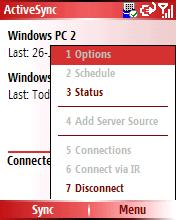
3)We are all set to go.Open ActiveSync on your mobile.Click on Menu->(#7)Connect via BlueTooth.Voila,You are connected now!!

So,now we are able to Sync our profile wirelessly!!Btb,Bluetooth is slower compared to the evergreen serial cable ;)
Read More >>

Sunday, July 23, 2006

My Experiences with WM5 ROM on HTC Typhoon

I have been using my Typhoon for quite some time now,one and a half year to be precise.To be honest,I loved my Typhoon more than any other phone I used till date but that soon died away with the release of Magneto a.k.a Windows Mobile 5 ROM enabled phones.I was desperate to try this latest innovation on my Typhoon but in vain.I managed to lay my hands on a 'so-called' wm5 ROM but I heard that there were many flaws associated with that ROM!!

I kept on researching for a far more compatible ROM on my Typhoon untill I laid my hands on Ronswens' WM5 ROM v4.0.I had to perform a ROM backup 'cos Krome guys would not provide me a ROM to download @ Krome.com.au I loved the WM5 ROM on my Typhoon more than anything else. After a week's usage of this ROM,Ronswens released an enhanced version of wm5 ROM;v4.2.This version blends perfectly with my Typhoon.

Few of my observations with this splendid ROM ::

1)This ROM is cooked from a leaked version of the Magneto which had a problem with memory management (Memory Leaking).

2)Soon after I reboot the phone,I'm left with 9.25 MB of free RAM left.This free RAM goes on decreasing while you use so many apps that are installed on your phone.To get the RAM back to healthy levels,you need to use CeleTask(Long Press Home) -->Menu-->5-->3 (free memory).

3)Camera application is inherited from WM2003 ROM,so ailry good quality of pictures!!Wanna check the quality of Pics :: www.kirankonathala.com

4)I have compiled a list of Apps which are compatilbe with wm5 enabled Typhoon.Check them out here.

5)Battery backup after installing WM5 is quite good too.I have a full one day's backup even after general use of GPRS,CAM,Calls,...

6)I can now use Opera 8.60 (ppc version) for downloading stuff directly to the Mini SD card.

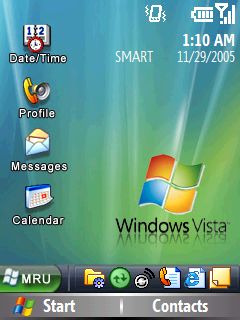
7)A clean and new GUI with WM5!!The all important Windows Media Player 10 rocks on my typhoon!!

8)I use my typhoon as a bluetooth modem.The only problem with this is it sports Error 777 when I try to dial it.Resolution::Toggle bluetooth using Bluetooth toggler (found in accessories).If it doesnt' work,we need to restart the phone.It should definitely work now!

Bottom Line :: WM5 v4.2 is still due from Ronswens.It is supposed to be A2DP enabled ROM.Eagerly waiting for it.....
Read More >>

Thursday, July 13, 2006

Linux port to HTC Smartphones


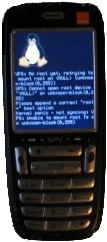
Well well,Kudos to freelancers.Linux on windows smartphones :: hard to imagine but they have implemented it partially and the final version is still due. This release is not for the faint-hearted,beware!!

Currently,the status of the project is as follows::
General Status in progress booting to userland on initrd
Framebuffer done panels for other models to be added
USB done
IrDA todo need to update the OMAP driver
Bluetooth todo
mini-SD todo update OMAP driver to support short registers
GSM in progress char device interface, few commands tested, needs blocking I/O and interrupt mode
Audio todo try to reuse McBSP and audio drivers
Keypad done
Leds done
Power Managementtodo lcd backlight, keypad light, power button, sleep modes

If you wanna try this ROM image,you can download it here.

Learn more about this project here.
Will be updating this post once the full release is prepared!!
Read More >>

Sunday, June 18, 2006

Minimo 0.016 Review :: Ups and Downs

Let me take the pleasure of introducing few pros and cons of Minimo 0.016 on your WM5 Smartphone.

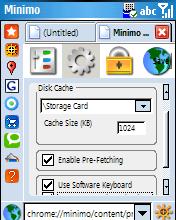
Finally I can make use of Cache on Storage Card and download files directly to Storage Card.

I can easily close the open tabs on Minimo which seemed next to impossible on the previous version of Minimo.

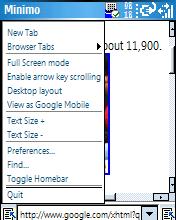
I was successful in opening more than 2 windows in the browser but am sorry to say that the amount of free memory (RAM) is too low which leads to your device being 'too slow' or 'unresponsive'.A better thing would be to visit all the sites via google.com/xhtml gateway which might help you in the nagging memory issue!!

I must say that Minimo is still not the best choice for Smartphones but on the flip side,Pocket PC users can enjoy this marvel to the fullest!!We should wait for memory optimization still.

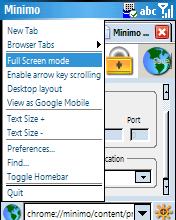
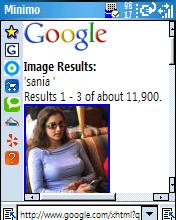
Screenshots of 'Preferences tab on Minimo' :: (Minimo 0.016 on WM5 Smartphone :: Applicable to Typhoons with WM5 ROM from Ronswens)

Read More >>

Wednesday, May 31, 2006

Windows Mobile 5 Smartphone Applications (Typhoon)

Well,I have been successfully using WM5 ROM by Ronswens and am happy to say that I'm a happier customer of HTC Typhoon (bought it on Jan 2005) .WM5 ROM really outshines WM 2003 SE ROM.I started experimenting heavily using this ROM and am successful so far except for A2DP profile thingy which may be sorted out pretty soon by Ronswens!!

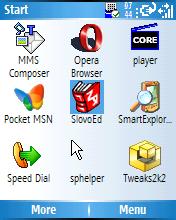
I have compiled a list of applications which I have been successfully using for quite sometime now.Feel free to add your fav. apps to this growing list of WM5 apps::

  • Agile Messenger : Good old messaging client (Yahoo,MSN,AOL). =>Download<=
  • TCPMP Core Player : The best media player (AVI,MPEG videos created using Lathe). =>Download<=
  • Opera Browser 8.60 : A full review is pending on this niche product!!Thank you Opera for the ultimate experience! =>Download<=
  • Opera mini 2.0 : The world's best light-weight browser(lesser memory occupied) with download capabilities which also enables us to save images for the first time in Smartphone history! =>Download<=
  • Minimo 0.015 (working Partially) : Doug Turner needs to work hard on this splendid product.Its in an early beta stage,hence not running to its fullest potential in my Typhoon!!(Download the CAB file and extract files using WinRAR.Copy the extracted folder to your phone's storage card and launch minimo.exe file) =>Download<=
  • SlovoEd English Dictionary : Well,this app. really rocks!!I would recommend you if you are a student(prep for TOEFL/GRE/College/School) or a job holder!!The entire dictionary in one slim device,dats what is innovation!! =>Download<=
  • SmartExplorer : This app plunges the loop hole in wm smartphones by enabling us to transfer files via Bluetooth. =>Download<=
  • SpHelper : This is a nifty utility which enables you to run Pocket PC apps. in a rather friendly manner ;) I found it useful when am using Minimo,Opera 8.60 PPC Browser. =>Download<=
  • Tweaks2k2 : Are you so lazy to manually RegEdit your smartphone to achieve few important tasks??Well,this app. is for you then!Have a go at it!! =>Download<=
  • XBar 3 : This tiny app helps you copy/paste,launch/close apps and a lot more!An must use utility!! =>Download<=
  • Pocket Controller Professional : Well,from now on,I will be posting screenshots of apps running on my Typhoon and its possible using this app. alongwith MS Power Toys. =>Download<=
  • ClearVue Suite 2.41 (SmartPhone) : I had to open few important word documents and then began my journey to Zero-in on a fine app for this purpose.Though the Zooming feature needs to be worked a bit,its a better option for the time-being!! =>Download<=
Read More >>

Sunday, May 21, 2006

Windows Mobile 5 on HTC Typhoon a.k.a Krome IQ700

I'm very excited to say that I have been successful in installing Windows Mobile 5 on my Windows Smartphone.I had to wait for so many days to test WM5 and finally,here I am,posting my 10 day experiences with this new ROM.

Firstly,if you are interested in trying this out:::
Backup your exisiting WM2003 ROM using the steps explained here.
Now,you can go ahead and download the latest version of WM5 from ronswens site(Version 4.1).
Ronswens described installation steps in great detail here.

Version 4.1 of WM5 for Typhoon is released pretty recently.I tested Version 4.0 and here goes my observations::
1)Pretty few amount of RAM(only 33%==5~6MB) is available when the phone boots.You can use Celetask(long press Home button) to close the unnecessary apps. and refreshing the memory.
2)When I use my phone as Bluetooth modem,sometimes it throws error msgs.We need to retry few times before we can connect.USB modem works fine though!!Bluetooth modem behaves properly at times!!
3)Cool new features added(few important apps. such as CeleTask,WMP10.0,... and the menu is changed too.You need to experience the new feel!!

Finally,I can now boast of using Opera with download manager.That means,I can download files directly to my phone,no more relying on PockeIE.I will discuss more about installing that version of Opera in my next post!!

p.s::From now on,I'm going to blog on apps. running on my WM5 enabled Typhoon.
Read More >>

Thursday, May 4, 2006

Opera Mini 2.0 Improved Features (Review)


Opera plays a silent cat's role by releasing a 'pepped-up' version of Opera Mini.I have tried it on my HTC Typhoon and was taken aback on its improved feature set!Some of the changes are::

1)A revised UI(minor change)
2)Better Navigation(Smooth scroll)
3)Image save option(PIE opens up)
4)File Download option(Partial Implementation)
5)Option to Add Different Search Engines in UI
6)Slightly faster Operation(Overall)

The much coveted feature::Download Option was missing for Smartphones to date and Opera Mini tries to fill this void.Hmm,we couldnt' yet see the 'Transfer' option as in Symbian versions of Opera.In this version of Opera Mini,whenever we try to download a file/image,the control is transfered to Pocket IE and the download commences there itself.You should use SmartExplorer to download a wider variety of files (*.cab/.zip/.rm/so on...).Much about that in my next post!!
Thank you Opera for this productive and free release of Opera Mini 2.0!!
Read More >>